

Blog Categories
Web design Branding Blogging Social Media Inbound All
We post weekly tips, tricks, and marketing advice to help grow your business.

The Revelation I Made In Puerto Rico (It Might Surprise You)
A few weeks ago, I took a vacation to Puerto Rico with one of my besties. (A much needed vacation.) The goal of our trip: RELAXATION. As we were waiting at our gate to depart, we made a pact to not check social media while we were away. You’ll never believe what happens next …

A few weeks ago, I took a vacation to Puerto Rico with one of my besties. A much needed vacation. The goal of our trip: RELAXATION. As we were waiting at our gate to depart, we made a pact to not check social media while we were away. I couldn’t be happier to log off and fully disconnect! Actually, I had been tinkering with the thought of ditching social media in my personal life so the timing was quite perfect to finally do so. After agreeing to abandon Facebook and Instagram for a week, we both moved the icons for those tempting little apps right off the main screen on our iPhones. Ahhhhhhhh! It felt incredibly refreshing!
After landing in Puerto Rico, we had some time to spare before our room was ready. In true fashion, we found our way to the 5 O’Clock Somewhere Bar to celebrate our girl’s trip with some Prosecco. Now, the old me would have immediately busted out my phone to take the obligatory selfie for a social media post. I’ll admit … the thought did cross my mind but the new me left my phone in my bag and instead, soaked in the sound of the crashing waves in the background. And that’s when it really, truly hit me. The magnitude of what we miss when we’re focused on our cell phone screens. How many precious moments get stolen by our attachment to social media?

No camera can really capture the true beauty of a sunset.
And then there’s the productivity piece of this frightening equation.
🕛Scrolling through the Facebook feed.
🕒Liking photos on Instagram.
🕧 Watching videos on YouTube.
🕘Posting stuff.
🕑Going back and checking your posts to see who has commented.
⏰OMG!
Honestly, how many hours of productivity are lost per day … per week … per month … ?! Eeeeeekkk!
I’m not sure if it was because I was on a beautiful island in the Caribbean or what but it suddenly clicked for me. A revelation that I believe has been building for awhile but finally came to light in lovely Puerto Rico.
Social media SUCKS.
Now granted, I do believe there are some positive aspects of it. I get to share in the experiences of my family and friends who don’t live close by. I’m reminded of special birthdays, anniversaries, or other life events. I can do a little networking here and there. I can view photos of dogs, which always makes me smile.
However, when I really started thinking about the bigger picture, it became evident to me that social media was actually having a more negative impact in my life than a positive one. More often than not, I’d close out of Facebook or Instagram feeling bad about myself … and I lead a pretty great life so that’s absurd. Self doubt, negativity, jealousy. All of those terrible things that can send you off on an emotional roller coaster.
It was there at the 5 O’Clock Somewhere Bar … beside my friend … surrounded by happy native pups looking for French fries and burger scraps … soothed by the sounds of the sea … I made the choice to take a break from social media.

I’ll just chill here
Until you drop something :)
At the time I’m writing this post, it has now been 22 days since I’ve checked any of my personal social media accounts. (Business is different. That’s a necessary evil but one that I can live with at the moment.) It has made such an impact in my life that I decided to blog about it. I’m feeling so fabulous about this hiatus that I hope to inspire you to take a break from social media, too!
Here are some of the changes I’ve experienced since my break-up with social media:
I have a more positive body image.
I can think more clearly.
I’m less distracted.
I’m more productive during my work day.
I’m less stressed out overall.
I’m more confident about where I am in life.
I feel an incredible sense of empowerment.
I’m able to be in the moment.
I enjoy more meaningful time with my husband, friends, and family.
I’m just plain happier.
Will I ever be on social media again? I’m not sure. Honestly, it feels like giving up sugar or wine for awhile. There are just so many immediate and positive effects. I’d like to say I’m done forever. However, just like with sugar and wine, it’s tempting and easy to go back. Although if I had to choose between Facebook and wine … and I could only have one for the rest of my life … it’s wine all the way! 🍷
I encourage you to take a challenge. Try giving up social media for a single week. (It’s only a week … you can do anything for a week, right?!) I promise you, you’ll be pleasantly surprised at how it makes you feel. If you do give it a whirl, I’d love to know how it works out for you.

Take a 1-week break from social media … we dare you!

3 Tips For A Boudoir Photographer To Grow On Social Media
Our agency specializes in marketing for boudoir photographers so we’ve come to learn that y’all are crazy busy all the time. The luxury of the extra time that’s needed to nurture social media growth is simply non-existent for many photographers.
In our latest blog post, we’re going to share the three things we consistently do to grow accounts.

Think your best performing social media platform as a garden. The soil is your content, filled with the rich nutrients of eye-catching imagery and desired information. You’re ready to plant more seeds and share your art with the world. And just as you want your daisies to sprout, you also want your content to flourish.
Sure, you can throw a bunch of seeds in the ground and hope for the best. However, the most successful brands on social media ... like the most beautiful gardens ... thrive on constant nurturing and some good old TLC.
One thing I always tell our boudoir photographer clients is that social growth really isn’t rocket science. The theory behind it is simple. Although, while it’s not complicated, growth on social media is time consuming and requires consistency and great content.
Our agency specializes in marketing for boudoir photographers so I’ve come to learn that y’all are crazy busy all the time. The luxury of the extra time that’s needed to nurture social media growth is simply non-existent for many photographers. Psssst … that’s where we come in! [Queue superhero music.]
I’ve handled social media management for many boudoir photographers and in this quick post, I’m going to share the three things I consistently do to grow the accounts.
1. Identify your target audience.
This step is extremely important. Clearly identifying who your ideal client is will make it a million times easier to connect with them on social media. When developing your target client persona, write a profile or backstory about them. (Then keep this information very handy because it will come in useful for all of your marketing endeavors.)
When writing your client persona, get specific on these things:
Their name
Their age
Where they live
Their relationship/family status
Their education level
Their occupation
Their annual income
Websites they like / what blogs or YouTube channels they subscribe to
Magazines or books they like to read
Podcasts they listen to
Their hobbies
Brands they like
Social media platforms they spend time on
TV shows they watch
Creating a detailed client persona will not only help you focus on the best social media channels to invest time and energy in, but set the tone for your imagery and messaging, too.
2. Use hashtags wisely.
If you’re on Instagram, then you know the importance of hashtags. So where to begin? Well, for most of my boudoir photographer clients, I leverage their ideal client persona to identify hashtags that will be relatable to the people who fit the description.
To give you an example, let’s say we have a boudoir photographer based out of Charleston, South Carolina. This photographer’s target client is a career woman in her 30’s. I’ll seek out popular hashtags in the Charleston area that would apply to this woman. #charlestonmom #charlestonrealtor #southcarolinaliving #charlestonlifestyle #charlestonfitness are a few that come to mind. Don’t be afraid to venture out and get creative.
If you’re focusing on a specific geographical territory, you can take a look at other hashtags that are less obvious but may still yield results that lead you to your target lady. For example, if you’re close by a major city that’s known for some hot foodie destinations, plug in a foodie hashtag with the city attached to see what pops up. The same can apply if there’s a significant landmark that’s popular with your target age bracket.
My point is, we don’t live in a bubble and neither do your ideal clients. Get creative and think outside the box with your hashtags.
3. Engage, engage, and then engage some more.
Growing your brand on social media means more than just posting content. A large piece of it actually involves responding to comments and engaging with other accounts. I know … you’re on a time crunch and this is asking a lot! However, if you tackle it with a plan, you can conquer it. Here’s what I do. I’ll either:
Dedicate a certain amount of time to commenting/engaging or (i.e. 30 minutes) OR
Set a certain number of accounts to engage with per day (i.e. 20 accounts)
Whatever fits into your schedule or works for you. The point is, make it a point to engage regularly!
Now, this next tip is SUPER important:
Likes will not quench your seedlings thirst. You should absolutely like posts but you need to make relevant comments that pertain to the post as well. A generic “Nice job” or “Cool dog” will not suffice. Your comments should be at least four words in length. Emojis are fun but do not count. Sorry.
Example: You found an account of someone who fits your ideal client persona and see a picture she posted of her two kids at a local taco spot. You could post “Cute kids!” but you SHOULD post “Your kids are too cute! I definitely want to try the tacos there. How did you like them?”
Granted, this is a very specific example but my point is that you need to be specific and show legitimate interest in the content. Refrain from sounding like a bot at all costs! Bot-like comments are not going to give your followers the warm and fuzzies. Sound like an actual person because you are an actual person. Appear approachable and genuine.
Last but not least, make it a priority to nurture the comments that people make on your posts! It’s easy to get wrapped up in trying to engage with new clients but never forget about your existing circle. Show your peeps some love and don’t leave them hanging!
There ya have it. Not rocket science but definitely a labor of love. You got this and if you don’t, you got us. Peace out, pineapples! ✌🏼🍍
-Katie

40 Social Media Content Ideas For 2019
Don’t you hate the days when your creative juices just aren’t flowing? This can be especially aggravating when you’re trying to come up with social media posts. You’re pressed for time and want to get something out there … but nothing’s hitting you. Ugggghhhh. Don’t feel bad! We’ve all been there. That’s why we decided to create this magnificent list of 40 social media post ideas for your business! Bookmark this post and never feel stuck when it comes to creating fresh content ever again.

Don’t you hate the days when your creative juices just aren’t flowing? This can be especially aggravating when you’re trying to come up with social media posts. You’re pressed for time and want to get something out there … but nothing’s hitting you. Ugggghhhh. Don’t feel bad! We’ve all been there. That’s why we decided to create this magnificent list of 40 social media post ideas for your business! Bookmark this post and never feel stuck when it comes to creating fresh content ever again.
1. Motivational quotes
2. Behind-the-scenes photos
3. Answer a question
4. Showcase a client or customer
5. Share a testimonial
6. Share a work/life balance tip
7. Share a throwback photo
8. Post a photo and ask your audience to caption it
9. Share one of your blog posts
10. Share a blog post relevant to your industry
11. Celebrate special days of the year
12. Make an infographic and share it
13. Post a product image
14. Post pet pics
15. Post a product you love to use
16. Quick tips
17. Share a Spotify playlist
18. Survey your audience
19. Share a statistic
20. Reveal a fun fact about your brand
21. Repurpose top performing past posts
22. Post a video
23. Go live!
24. Share your own quote
25. Create a helpful list
26. Share something that inspires you
27. Share a free eBook, worksheet, or guide
28. Make a bucket list
29. Myths vs. facts
30. Create a cheat sheet
31. Top 10
32. How-To
33. Create a contest
34. Tag-a-friend content
35. Branded graphics
36. Get playful with Emojis 😉
37. Product or service updates
38. Industry news flash
39. Share a hack
40. Step-by-step quick instructions
Some themed hashtags to consider ...
#Motivational Monday
#TransformationTuesday
#TopicTuesday
#WayBackWednesday
#HumpDay
#tbt (Throwback Thursday)
#ThursdayThoughts
#ThirstyThursday
#FeatureFriday
#FoodieFriday
#FeelGoodFriday
#SmallBusinessSaturday
#SundayFunday
Hopefully we’ve got those creative juices flowing again!
Don’t let your social media accounts slip through the cracks. Create a content calendar to map out all of your posts each and every month. Need help getting started? Read this post:
How To Make A Content Calendar Using The Google Drive
Not enough hours in the day to manage all the social media things? We can help!
Book a FREE 15-minute social media consult with us.


How To Write Social Media Captions For Boudoir Photography
When we realized that our little agency was a hit in this big industry, we soaked it all up. Over the past year, we’ve worked with several boudoir photographers all over the U.S. to help them grow a presence and develop their brand on social media.
So what does social media management for a boudoir photographer look like? Well, in a nutshell, the photographer provides us with a voluptuous gallery of content, gives us creative freedom to use whatever images we think will work best, and attach a caption accordingly. (We also implement a strategy for increasing engagement and growth of the platforms but we’ll leave that wealth of wisdom for a different post.)
In this blog post, I’m going to share how I come up with captions for the boudoir photographer social media accounts that I manage. Here goes!

Ok, it’s no secret that marketing for boudoir photographers is our cup of tea. 😏Our passion for the industry is derived from our appreciation of the female form. We’re all about encouraging positive body image. I myself have participated in several boudoir shoots … and I know first-hand what the experience can do for the self-esteem. (Read about my very first shoot here!)
When we realized that our little agency was a hit in this big industry, we soaked it all up. Over the past year, we’ve worked with several boudoir photographers all over the U.S. to help them grow a presence and develop their brand on social media.
So what does social media management for a boudoir photographer look like? Well, in a nutshell, the photographer provides us with a voluptuous gallery of content, gives us creative freedom to use whatever images we think will work best, and attach a caption accordingly. (We also implement a strategy for increasing engagement and growth of the platforms but we’ll leave that wealth of wisdom for a different post.)
In this blog post, I’m going to share how I come up with captions for the boudoir photographer social media accounts that I manage. Here goes!
Identify your vibe.
All boudoir photographers may share a common theme of nude or almost nude images but that’s pretty much where the similarities end. Boudoir is an art and each photographer has a very different style and vibe. With that said, I never ever EVER use the same captions on different photos from different photographers. To be blunt, it’s lazy and just not how our agency rolls. The captions I come up with are completely based on each photographer’s vibe.
For example, we have boudoir photographer clients who lean toward a soft, whimsical feel. We have clients who showcase an erotic or darker side in their art. Natural … glamorous … dramatic … you name it, I’ve written copy or selected captions for the style! The goal is to always mimic the style of the photographer.
The captions must flow with your style of art. If you specialize in outdoor boudoir and have a gallery full of fantasy or fairytale type images, the captions used on your social media platforms will be very different from a photographer who boasts black leather and red lipstick in their work. Always match the tone of the caption to the style of the work.
Variety is key.
I tend to gravitate toward quotes from poets. However, I’m not a one-trick pony so I like to keep things interesting. I’ll pull in engaging mantras, “10 Ways How To … ,” or ask a question seeking a response. Some days I’ll mix in a “How are you spending your Sunday Funday?” The point is, don’t just slap a Marilyn Monroe quote on every photo and hope for the best. You need to put some thought and energy into your captions. It makes a huge difference and will set you apart.
Also, the tone of your captioning should somewhat represent you as a photographer. Some of my clients are very open to blunt and sexually charged captions. It fits their personality and style as a photographer. I also have clients who are much more reserved or discreet. In these cases, I take a softer approach.
Keep in mind the region where you’re located, too! A photographer in the New York City area may have a more open-minded audience than perhaps a photographer in a Bible Belt state. Caption your photos so they speak to the audience you’re primarily serving.
Hashtags are life.
I mean, sometimes I view them as a necessary evil but you catch my drift. Using appropriate and geographical hashtags is a giant deal. Hashtagging “#boudoir,” “#boudoirphotography,” “#boudoirinspiration,” etc. is fine ... and it won’t hurt anything ... but broad hashtags are probably not going to help you a whole heck of a lot.
Who is your target audience (or buyer persona)? Is she a young mom in her 30’s? Do some research on popular hashtags for moms in your area. Or maybe your ideal client is a woman in her 50’s or 60’s who is a high-level executive. Take a gander at female career-focused hashtags in your region.
For more on crafting a detailed client persona, use our go-to tool: HubSpot’s Make My Persona Tool!
Lastly, don’t machine gun hashtag. It looks cheap and serves no purpose. Use relevant hashtags that have an actual following (who just so happens to match your ideal client persona).
Proofread your copy!
The death of all credibility can be attributed to poor grammar and punctuation. Seems silly and ridiculously simple but it’s legit ... and extremely important.
If you need a giggle, check out these epic grammatical mistakes made by marketers … shared by our friends at Impact!
Well, there you have it. Easy peasy, lemon squeezy. 🍋(Well, on second thought, maybe it’s not that easy because if it was, everyone would do it ... and we’d be out of a job. 🙀)
Just like your beautiful photography, successful social media management is an art. It’s an honor to be entrusted with the opportunity to share such empowering photos with the world. Follow these tips so you can do so in a way that preserves the authenticity and true beauty of what you see from behind your lens.
Looking for more marketing tips specific to the boudoir photography business? Subscribe to our blog!

The Only Reason We're On Instagram
This is a topic I’ve been eager to vent about for awhile now … so here goes! There used to be a time when I absolutely adored Instagram. No surprise, I’m a very visual person so I’m naturally drawn to beautiful photos. When I react or comment on photos that I like, it’s genuine. And, back in the good ole days, it would appear when other people commented or liked my photos, it was also genuine.
Fast forward to 2012. Facebook bought Instagram for $1 billion dollars. And since this time, the platform has transformed from a fun place to share photos with friends and followers to an overpopulated arena of fakers and bots. Now, I have no idea whether or not the Facebook acquisition had anything to do with this distressing turn of events however, I’m leaning toward it did.

This is a topic I’ve been eager to vent about for awhile now … so here goes! There used to be a time when I absolutely adored Instagram. No surprise, I’m a very visual person so I’m naturally drawn to beautiful photos. When I react or comment on photos that I like, it’s genuine. And, back in the good ole days, it would appear when other people commented or liked my photos, it was also genuine.
Fast forward to 2012. Facebook bought Instagram for $1 billion dollars. And since this time, the platform has transformed from a fun place to share photos with friends and followers to an overpopulated arena of fakers and bots. Now, I have no idea whether or not the Facebook acquisition had anything to do with this distressing turn of events however, I’m leaning toward it did.
Over the past year, I’ve seen a staggering increase in the number of bot-like comments on photos we post to our Little Marketing Genius account. Actually, I just looked back at our six most recent posts and a whopping FOUR of them have been commented on by bots. I’ve highlighted this ridiculousness below …

And what about those hashtags? Really? It was bad enough when you had to worry about simply coming up with quality content but now you need a hashtag strategy as well?! Heaven forbid you use a banned hashtag from the ever-evolving List of Banned Hashtags and get yourself blacklisted!
Read Katie’s Blog Post On How To Grow Your Social Media (Without Bots)
Now moving along to the most irritating thing I see happening on Instagram. The constant fluctuation in followers. People following your account in hopes you’ll follow them back and then, just as quickly, unfollowing you. It’s absurd! Honestly, what happened to the days of following accounts because you were genuinely interested in the content?
So with all of these grievances I just shared, you’re probably wondering why the heck we’re still using IG. The answer is quite simple: because it’s a necessary evil (just like Facebook 🙄).
The bottom line is we live in a world where being on social media legitimizes your business somehow.
I’ve been to networking events and marketing conferences where people don’t even pass out business cards anymore. Instead, they share their Instagram handle. And if you don’t have a handle to share with them … well, CLEARLY you’re not a professional.
The only reason we’re on Instagram is because, as a business, we have to be.
Do new leads come flooding in every time we publish an Instagram post? Nope. Do we close more business because we’re on Instagram. Definitely not. Does Instagram help support and build our brand. Absolutely! Not to mention, it’s provides another avenue for us to share helpful content with you guys! And for that reason, we’re here to stay (for the time being anyways).
Now I’m not saying that Instagram can’t be a main lead and sales driver for a business. What I’m saying is that for most small businesses, it just doesn’t work that way. Unless you’re an influencer or know the secret for regularly developing viral content, chances are, your small business is not going to explode just because of Instagram. Social media typically plays a part in your online marketing success but does not define it. It does, however, serve to compliment your other marketing strategies such as blogging and content creation.
Wow! I’m feeling much better now that I got all that off my chest! I’m curious, what are your thoughts on Instagram? Have you found success or do you feel frustrated most of the time? Comment down below!
Looking to revamp your marketing efforts in 2019? Do you want to take a more comprehensive approach that ties your social media into other marketing strategies? Click below to book a free consultation with us today!

How To Make A Content Calendar Using Google Drive
Planning out content in advance will save you from the stressful daily scramble of trying to come up with creative social media and blog posts. There are many tools out there for building content calendars but in today’s post, we’re going to teach you how to do it using your Google Drive.

Planning out content in advance will save you from the stressful daily scramble of trying to come up with creative social media and blog posts. There are many tools out there for building content calendars but in today’s post, we’re going to teach you how to do it using your Google Drive.
First off, you need to dedicate a few hours of quiet time to create your calendar. Depending on how much content you need to create from scratch, you may need a full day to work on this. However, it’s going to totally pay off so we highly recommend blocking out time and getting it done. 👊🏼
FYI: We build our content calendar a month in advance. We typically publish blog posts once a week so we make sure there’s enough material in the hopper before filling in the calendar.
We also like to craft social media content around our blog post topics. For instance, if we publish a blog post about How To Increase Organic Traffic To Your Website, then we’ll create one or two posts that tie in with that topic during the same week (i.e. a post about our Website Prep Planner and a tip for building a list of keywords).
The idea is to develop a cohesive communications plan. Once you get started, you’ll see how natural this becomes.
Creating Your Content Calendar Using Google Drive
Step 1:
Create a new folder on your Google Drive (and share it with any collaborators).
This is the main folder that’s going to house other folders and files. We named ours Content Calendar.
Step 2:
Create a folder within the new main folder and name it by Month and Year.
So, for example, if we’re building content for next month, we’d name the folder January 2019.

This is one week of content from our November calendar.
Step 3:
Create a new Google Sheet within the Month folder you just created.
Create a header row at the top of your sheet and enter the month and year. You can see in our calendar above, we’ve also highlighted this area in pink so it’s obvious what sheet we’re in.
Next, create seven rows for each day of the week. Underneath each day, fill in a general theme you’re going to use for content on that day throughout the month. In our example, you’ll see for November that we posted:
Blog content on Tuesday’s
A call-to-action (related to the blog topic) on Wednesday’s
A highlight on Thursday’s
A testimonial or inspirational quote on Friday’s
Then create your calendar by entering the dates that coordinate with each day. On our calendar, we made the text in these cells a lighter grey color.
FYI: Coming up with themes in advance will help you narrow in on the type of content you share on a daily basis. We plot out our themes so they’re consistent for the month (i.e. every Tuesday was a blog post promo in November). However, you can mix your themes up every week … it’s completely up to you!
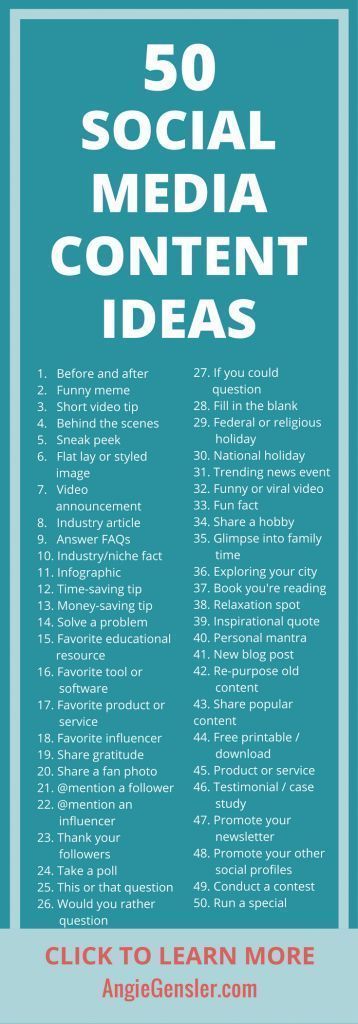
If you need some help coming up with topics and themes, check out this awesome list that Angie Gensler put together.
Using the themes you’ve determined, craft a message under each day you plan on posting content. We like to include our hashtags here as well. That way, we can copy and paste everything from the sheet directly into IG and Facebook.
Pro Tip 1:
If you want to use emojis in your caption, you can open up your iMessage on Mac, click to create a new message, and then enter your desired emoji into the type field. Copy and paste it from there into your Google Sheet.

Pro Tip 2:
If you plan on updating your IG bio link or using links in your Facebook or Twitter posts, you should paste these links in a cell below your caption for reference.
Step 4:
Create a folder within the Month folder to store images.
Collect the images you’d like to use for each post. Before dragging them into the Google Drive folder, rename them as the number of the day you plan on posting them. (i.e. Your image for January 17 would be named 17.jpg.) This way, you’ll know exactly what photo goes with what caption when it’s time to post.

Once you’ve uploaded all your images and filled in your monthly calendar, you can sit back and admire your work of art. And revel in the joy of knowing you have content lined up to share for the next four weeks! Woot-woot!
For tips on coming up with content for your calendar, read this blog post:
How To Create A Social Media Calendar

Get our Website Prep Planner, A 6-PAGE WORKBOOK TO HELP YOU ORGANIZE EVERYTHING YOU NEED FOR AN AWESOME WEBSITE.
How To Start A Business Blog
Starting a business blog might seem like a daunting task but we’re here to assure you it isn’t. Today we’ll explain the importance of having a blog and then outline a basic roadmap for getting started.

Starting a business blog might seem like a daunting task but we’re here to assure you it isn’t. Today we’ll explain the importance of having a blog and then outline a basic roadmap for getting started.
Why You Should Have A Business Blog
A blog will help generate traffic to your website. If you’re optimizing your posts for search engines, overtime, they will begin to rank in search results. Blog posts also serve as great content for social media! If your topics are interesting enough, you can expect to see clicks to your website as well as shares.
Step-by-Step Guide For Starting Your Business Blog
1. Research your audience.
A business blog differs from a personal blog in that it focuses on a specific niche and audience. In order to craft blog posts that will draw in your target audience, you first need to identify exactly who your target audience is.
“If you have worked with your company for a long time, you may feel like you have a good grasp on who your customer is, but it still helps to actually put those ideas to paper. Are the majority of your customers male or female? Where do they live? What do they do for a living? What are their buying habits? What are their needs and challenges? What questions do they ask?”
By gaining a deep understanding of your target audience, it will be easier to develop content that truly interests them. Through this process, you’ll also learn what style your messaging should be delivered in and where you audience goes to seek information.
GET Jamie & Katie’s FREE Guide To Blogging!
2. Plot out your keywords.
In order to get found in Google searches, the content on your website and blog needs to reflect what potential site visitors are actually searching for. Make a list of as many long-tail and short-tail keywords as possible.
A long-tail keyword contains three or more words (i.e. chocolate wedding cupcakes Middletown). A short-tail keywords are typically under three words and essentially more broad in nature (i.e. chocolate cupcakes). You’ll want to include a healthy mix of both throughout your website and blog.
“Naturally, short term keywords are bound to give your website more hits since they are less specific. These short tail keywords are able to capture a bigger share of your target market. However, long tail keywords are more about giving quality hits than a large number of traffic. Targeting short tail keywords, however makes yielding positive results difficult and are often time consuming and expensive.”
(Quora)
3. Create an editorial calendar.
Once you’ve developed a list of keywords, coming up with topics to write about will be a breeze. If you’re still left feeling stumped, you can read our post, “3 Ways To Come Up With Blog Post Topics.”
We like to use an editorial calendar so we can tie our blog posts into our other marketing efforts such as social media campaigns and paid Google ads. By planning out our posts in advance, we can easily build other content around each topic and avoid the headaches associated with scrambling for new ideas each week. It’s all about being prepared!
4. Devise a plan for CTAs.
If you’ve enticed a visitor to read a blog post, don’t miss the opportunity to engage them even more! Include a call-to-action that fits the context of each post. Let the reader know what action you’d like them to take next. If you published a post about The Benefits Of Hot Yoga, offer them a Beginner’s Guide To Yoga Poses or a coupon to try a free class. The idea is to keep the visitor active on your website for as long as possible.
5. Track your success.
Whatever platform you use to host your blog, make sure you’re getting the most out of it. Regularly analyze the traffic and CTA clicks for each post so you can see how it stacks up against the rest. Having these insights will allow you to better leverage your hot topics in the future!
6. Share your posts with the world!
Put your social media sites to work and be sure to share each and every blog post with your networks! Include an inspiring image that relates to the post (along with the link) and encourage your followers to share. This will help drive traffic to your blog and hopefully score you new subscribers!
Ready to master the art of blogging?


From The Mouths Of Smiling Customers: 4 Creative Ways To Repurpose Your Reviews
People trust their peers more than they trust marketers. That’s why it’s incredibly wise to try and leverage any glowing reviews you receive from happy customers or clients. How can you go about doing this? Let’s jump right in!

It’s quite literally one of the best feelings ever. That moment when you receive a notification from Google stating that someone left you a 5-star review. I don’t know about you but whenever I see one of these, I immediately stop what I’m doing to go check it out. Seriously. I can barely contain myself in these moments.
Reviews … either positive or negative ... can seriously impact your business. Why? Because people trust their peers more than they trust marketers! Forbes research showed that “81% of consumers’ purchasing decisions are influenced by their friends’ social media posts.”
And according to Harvard Business Review, “84% of B2B buyers are now starting the purchasing process with a referral, and peer recommendations are influencing more than 90% of all B2B buying decisions.”
People trust their peers more than they trust marketers. That’s why it’s incredibly wise to try and leverage any glowing reviews you receive from happy customers or clients. How can you go about doing this? Let’s jump right in!
1. Create a graphic for social media.
Research has proven that social media plays a significant role in the buyer’s journey. Social Media Today sheds some additional light on this trend:
“There is safety in numbers. Human beings in general have a crowd mentality. This phenomenon is behind trends and fashions because people opt to move together in large groups. Thus, it is easy to sway them when they are in groups. This is why social media has become a hit when it comes to marketing. People will largely be convinced to make a buying decision if their peers have already done so. All you need to do is to demonstrate to them how the same product has benefited their peers and friends.”
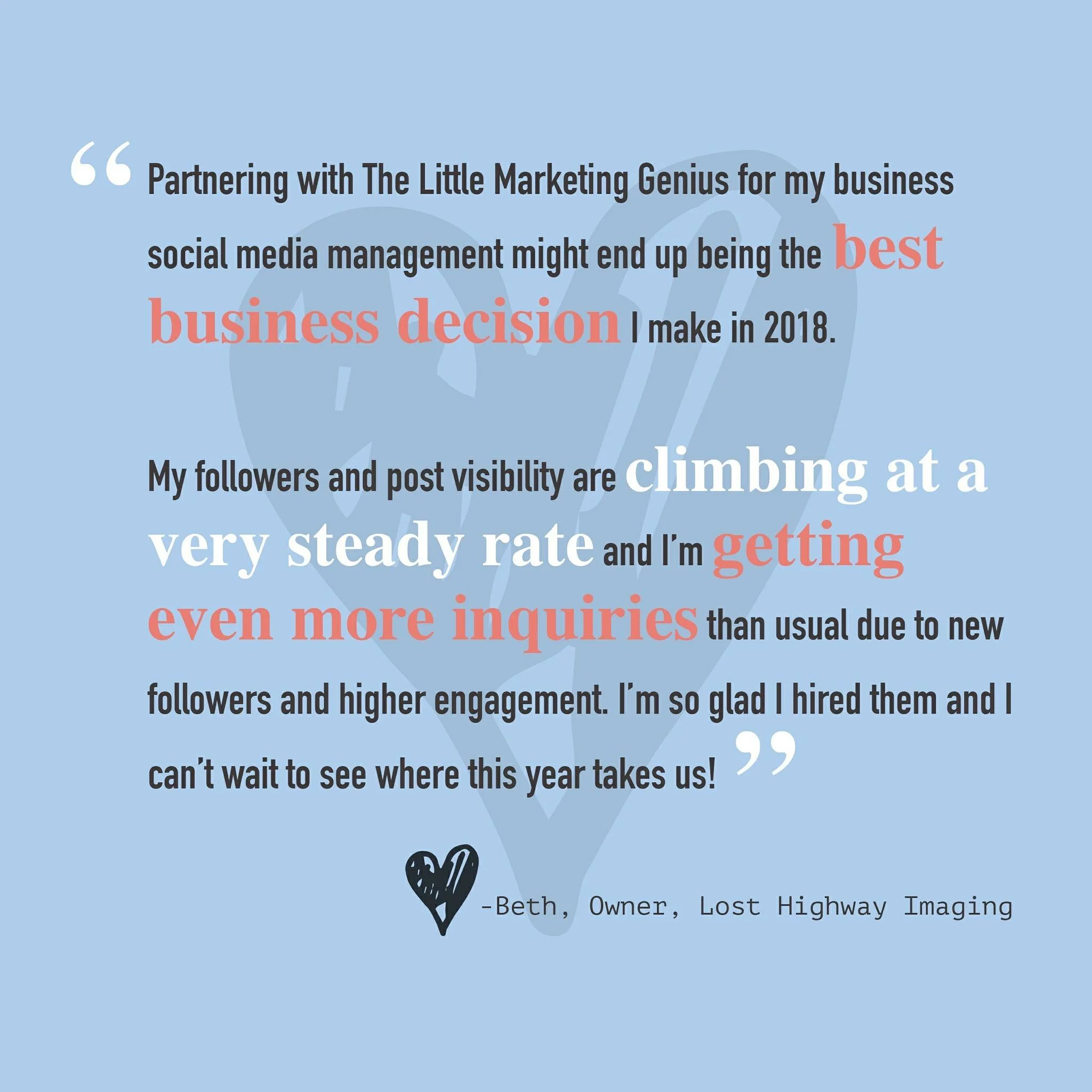
Touting positive reviews in a creative way on social media can pay dividends. By using a platform like Canva, you can quickly and easily overlay text on top of a graphic. Pull little excerpts from your favorite reviews, make them visually appealing, tag the reviewer (with their permission), and post away. It’s as simple as that! Here’s an example of a graphic we created from a Google Review left by one of our favorite clients!
2. Feature your favs in your IG Story.
We love Instagram Stories for many reasons. One reason being we can showcase client reviews there in a really fun way! To see how we do this, simply visit our Instagram (@thelittlemarketinggenius) and click on the Reviews highlight!
Pro Tip: If you can persuade any of your customers to do a short video shout-out, you can upload it to your IG Story for maximum impact
3. Create a Reviews page on your website.
Your customers can essentially post reviews about you in a number of different places … Google, Facebook, Yelp, Trip Advisor … the list goes on. So why not organize the best of these reviews onto a single page on your website? Potential clients love to hear about the successes of other clients. A Testimonials or Reviews page is a great way to showcase all of the kudos you’ve already received. See how we’ve set up our Testimonial Page here.
4. Showcase a blurb in your newsletter.
If you email a regular newsletter to your subscribers, first off, you get a gold star! A newsletter is a great way to stay in front of your audience by sharing current info, events, and specials that pertain to your business. In your next newsletter, reserve a small section to include a blurb from a recent customer review or testimonial. It never hurts to remind your subscribers that you’re awesome (according to your clients).
Repurposing positive reviews and testimonials can pique the interest of future customers. Don’t be shy … use these to your advantage! If you have other creative ways of highlighting past reviews, share them with us in the comments!
Tuesday Tip #15: How To Create A Social Media Calendar
Raise your hand if you’re fed up with social media! Just when you think you’ve figured out the secret to success in growing your fan base and increasing engagement … BAM! … another algorithm change is announced. Not to mention, it’s one that will turn your current strategy completely upside-down. Ugggghhhh.
A social media calendar will help you stay on point. Yes, it will take some work on the front end but that work will pay dividends in the end. By strategizing and outlining your posts in advance, you’ll drastically reduce the daily stress that comes with managing social media accounts. In this post, we’ll teach you how to put together your first social media calendar!

Raise your hand if you’re fed up with social media! Just when you think you’ve figured out the secret to success in growing your fan base and increasing engagement … BAM! … another algorithm change is announced. Not to mention, it’s one that will turn your current strategy completely upside-down. Ugggghhhh.
Ok, don’t throw in the towel yet. Instead, first read our post on How To Grow Your Social Media (which outlines ways to work with the latest algorithm updates). Then, get yourself organized. It’s hard enough to try and stay current with the constantly changing rules of engagement on social media. Combine that with the energy it takes to create interesting posts on a daily basis … we’re talking lots of EFFORT, folks! That’s why putting together a social media calendar is so critical.
A social media calendar will help you stay on point. Yes, it will take some work on the front end but that work will pay dividends later on. By strategizing and outlining your posts in advance, you’ll drastically reduce the daily stress that comes with managing social media accounts. Staying organized and consistently posting great content will put you at a major advantage. Try it for a month and you’ll see exactly what we mean!
So where to begin? Well, right here, actually. We’ve developed some simple guidelines to help you create your first editorial calendar for social media!
Determine what kind of content has performed best for you in the past.
With Facebook’s new algorithm change, content that doesn’t spark reactions/comments/shares has no chance of reaching a larger audience. That said, you’ll need to rely upon analytics to see what has worked for you in the past. On Facebook and Instagram, you should take a deep dive into your Insights and make note of the posts that outperformed the rest. This will be a great starting place for building your calendar.
Figure out your optimal posting times.
To get the biggest bang for your buck, you'll want to publish content during the times your audience is actually using social media. On Facebook, you can go to Insights and look in the Post Engagements section. This is where you’ll be able to see what days and times your audience engages the most.
Build your editorial calendar.
Now that you know what content resonates most with your audience and when to post, you’re ready to start building your social media calendar. First, let’s highlight some of the tools you can use to do this:
After you pick the tool that will work best for plotting out your posts, you can fill in your calendar with content, links, images, infographics, and more.
“These social messages will ensure you’re providing your audience with smart, useful content and give them a reason to follow you. Additionally, you can find relevant holidays or events–from Thanksgiving to National Ice Cream Day–that you can tie in with your business.” (Sprout Social)
Prioritizing content should also be a part of your process. Sprout Social makes some great recommendations for doing this:
“Think through your must-haves, whether it is a product release or scheduled company announcement, and develop content to promote those initiatives. Additionally, make sure you’re planning out how much promotion each initiative warrants; some large releases should have multiple social posts while others only warrant one. Lastly, pump up the personality of your editorial calendar by planning out posts that highlight company culture or showcase who you are as a brand.”

Organize your hashtags.
Adding hashtags to your social media posts will increase their chances of getting discovered. Do some research to determine which hashtags are trending in your industry. Jot them down in a Google doc along with any other hashtags that are specific to your brand or simply ones that you see a benefit in using. Organizing your hashtag library in one place will save you from trying to remember what to use with each post.
Master the art of repurposing great content.
If you published a case study or blog post that your audience loved, come up with fun ways to continue promoting this high performing content on social media! For example, you can design an infographic to highlight takeaways from a longer piece of content. Or how about creating a short little video that ties in with the topic as well? There are endless ways to draw more attention to the great content you already own.
Yes, managing social media can be stressful … but when you plan ahead, the process is so much easier to handle!
If this post persuaded you to try making your first social media calendar, comment down below!
Every Tuesday we share easy and actionable advice you can take to refresh your current marketing plan. Follow us on Facebook and Instagram to see more!
#LMGTuesdayTips


Tuesday Tip #10: How To Grow Your Social Media
LEARN HOW TO CREATE BRANDING GUIDELINES! Your brand represents the personality of your small business. In order for people to easily make the connection between your company and your marketing, there needs to be consistency. Just think about how the big brands do it. …

You have so much to say and share with the world. You have incredible content full of relevant and captivating information. You need zero validation. You’ve got this. You post your content on Instagram and then grab the popcorn, anxiously awaiting to see your notifications light up like a Christmas tree … but then, nothing.
So, of course, the next logical move is to pay for ads and boosted content. You’ll see a spike in activity, assuming you’ve created an appropriate audience and have allotted a reasonable budget. However, is that spike in activity doing anything for you in the long run?

Let’s talk good old organic growth. This brings me back to the saying, “If you give a man a fish, he will eat for a night but if you teach him how to fish he will eat for years to come.” I know we’re not talking about fish but hear me out. If you pay for ads as a quick way to grab attention, that’s great ... but are you grabbing those likes as new followers? Or was it a single like on a single post and that was the end of that?
Now, if you take the time to build a foundation and grow your base of followers through consistency, engagement, and mutual interest, you will have invested followers who will continuously see your content and potentially share it and/or engage with it. And your growth will continue.
Alright, so how does one accomplish this? There are so many ways, as Hubspot outlines in this article but one of the key tools is social media growth. Think of your Instagram account, for example, as a tiny sapling. I like magnolia trees so I’m going to use that for my vision. Ok, so you plant your brand new baby tree. You nurture it and feed it. If you continuously and consistently care for it, your little tree will grow, digging its roots deeper and blossoming into a beautiful, flowering adult.
Now let me translate. I’m going to provide you with three keys to social media growth, which involves nurturing your followers like a tiny sapling. And it’s so simple that you won’t believe it. However, being simple doesn’t mean effortless. Remember, watering your baby tree is easy but constant care and attention is what really matters.
1. Follow other accounts.
The more people you follow, the higher the likelihood of them following you back. Take advantage of Instagram’s super handy list of recommendations on accounts to follow. Trying to obtain followers without following them first can be challenging. Think of it as a give and take relationship. You scratch my back, I'll scratch yours.

2. Show interest.
We have all fallen victim of the random bot comments under our posts. Example: You post a photo of a magnolia tree that you recently planted and you get the random comment of, “Wow, you look great.” Or possibly a one word comment like, “Cool.” For the most part, those are either comments from bots or they’re people being paid to grow an audience (and doing a crappy job at it). Generic irrelevant responses typically stick out like a sore thumb. Don’t be that account posting them. Like posts. Engage by commenting. And be sure your comments are specific and relevant!
3. Respond to comments left under your content.
Show an interest in your followers and give gratitude for them showing interest in you! Again, the more your audience sees real-life engagement happening within your account, the more likely they’ll become invested in what you have to say. Comments, likes, and shares lead to GROWTH.
Remember, for as enormous as the world of social media is, it strangely is a small world at the same time. Take the time to nurture your audience and you'll reap the benefits of a healthy and steadily blooming magnolia tree for all to enjoy and aspire to have.
Need a little help growing your small business social media accounts? Learn more about our Social Growth package!
Every Tuesday we share easy and actionable advice you can take to refresh your current marketing plan. Follow us on Facebook and Instagram to see more!