

Blog Categories
Web design Branding Blogging Social Media Inbound All
We post weekly tips, tricks, and marketing advice to help grow your business.

20 Free Google Fonts To Use In Your Boudoir Photography Business
Experimenting and playing with different fonts is quite frankly one of my favorite pastimes. I’m a designer … what can I say? If you’ve ever attempted searching for fonts to use on your boudoir photography website or a piece of marketing collateral then you know how challenging the process can be. There are literally thousands of amazing fonts out there. How does one choose? And then there’s the whole licensing thing. For example, there are different licenses for desktop and print, WebFonts, personal use vs. commercial use, and (my personal favorite) open-source. Yeah, who knew fonts were so complex?
Bookmark this blog post, boudoir photographers! I’m about to save you lots of time and energy when trying to pick fonts. I’ve selected 20 Google fonts that are bound to look fabulous in your marketing! Let’s explore them!

Photo by Atikh Bana on Unsplash
Experimenting and playing with different fonts is quite frankly one of my favorite pastimes. I’m a designer … what can I say? If you’ve ever attempted searching for fonts to use on your boudoir photography website or a piece of marketing collateral then you know how challenging the process can be. There are literally thousands of amazing fonts out there. How does one choose? And then there’s the whole licensing thing. For example, there are different licenses for desktop and print, WebFonts, personal use vs. commercial use, and (my personal favorite) open-source. Yeah, who knew fonts were so complex?
Bookmark this blog post, boudoir photographers! I’m about to save you lots of time and energy when trying to pick fonts. I’ve selected 20 Google fonts that are bound to look fabulous in your marketing! Let’s explore them!
Why Google fonts?
Google fonts are a top choice of designers. Why? Because they’re open-source so you won’t have to worry about license infringement!
“All of the fonts are Open Source. This means that you are free to share your favorites with friends and colleagues. You can even customize them for your own use, or collaborate with the original designer to improve them. And you can use them in every way you want, privately or commercially — in print, on your computer, or in your websites.” (Design Shack)
Need I say more?
Aside from the open-source licensing, another reason I love Google fonts is because of the variety. As I’m writing this post, there are currently a whopping 915 font families available! The library offers a robust mix of beautiful styles that can be mixed and matched to suit any brand.
So without further ado, let’s look at some lovely typeface!
Here are my top 20 favorite fonts for making a boudoir photography brand pop!

1. Dynalight
Dynalight is the script that love letters are made from. Dainty and seductive. Innocence unraveled. Sound like the personality behind your brand? Discover the versatility of Dynalight by playing with different colors and sizes.

2. Dancing Script
Does your brand as a boudoir photographer appeal to the girly-girl? Pink. Flowery. Festive. Flirty! Dancing Script is feminine and fun. I’d suggest using this font as a rich pink or magenta headline against a soft and simple background. Girl power!

3. Forum
Simple and crisp, Forum is a serif font that exudes elegance. Check out that uppercase Q! I recommend this font for body copy. It’s easy on the eye yet showcases a charming uniqueness. I’d use this font to elevate the look of the body copy within a brochure or guide.

4. Meddon
Meddon takes me back in time. Like the pristine penmanship that defines our Constitution, this font is refined and classy. With each letter flowing elegantly into the next, the words created in Meddon appear to stream effortlessly from a quill pen. Since this font is a thinner script, I would recommend using it as a headline on a solid background to really make an impact.

5. Pacifico
Pacifico is a chunky cursive font that reminds me of signage you might see in a surf shop. Easy-going, playful, and fun. For the beach town boudoir photographer who likes to let loose, this font is for you.

6. Arizonia
The lowercase letters in Arizonia are what really draws me to this font. A mix of relaxed handwriting and cursive, Arizonia combines the vibes of business and casual. This font would make for a lovely black and white headline.

7. Allura
If my handwriting could look like any font, I’d probably pick Allura. This cursive font is extremely clean and easy to read. Simply gorgeous. Being that it’s cursive, I would recommend using Allura for headlines or larger sub-heads.

8. Amatic Regular
Amatic comes in a few different versions but I like Regular the best! Amatic is an all caps font, which makes for a clean layout when stacking lines of copy on top of each other. Hassle-free and down-to-earth, meet Amatic!

9. Abril Fatface
I just had to add Abril Fatface to this collection. It’s thick and bold and shouts EMPOWERMENT! This font would look completely amazing as a black or navy blue headline against a pure white background. Is your brand on a mission to make a statement? Give it a whirl!
10. Satisfy
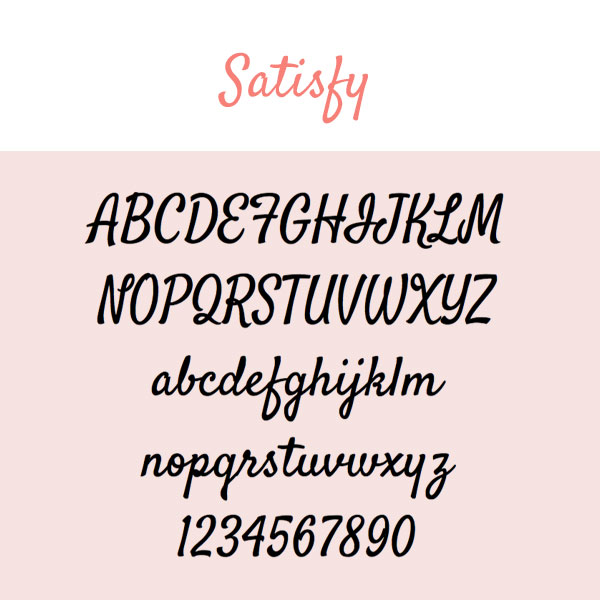
Yes, I picked a lot of scripty fonts for this boudoir-inspired collection! Satisfy is a more laid-back style of cursive. Some letters conform to the rules; some do not. Does your brand speak to the non-conformist? Try out Satisfy.

11. Yesteryear
Yesteryear is one of those fonts that reminds me of something yet I can’t quite put my finger on it. It evokes a familiarity. Déjà vu. The uppercase letters are striking. Their lowercase counterparts are delightful in their own right. Yesteryear makes a great choice for a headline that the eye will want to connect with.

12. Fredericka The Great
Does your brand tell a story … a fairytale? Do your clients leave feeling like a princess after shooting with you? If that sounds like your boudoir photography style, Fredericka is for you. Fredericka The Great looks like the text printed on an illustrated cover of a fairytale. It’s the font that will leave you feeling happily ever after. Test it out in all of the colors of your brand palette … it will not disappoint.

13. Tulpen One
Tulpen One is definitely one funky little font. Teardrop shapes differentiate this typeface, giving it an artistic and modern spin. Does your boudoir brand have a flare? Incorporate Tulpen One into your graphic designs! (Pssst…don’t be afraid to use all caps with this one!)
14. Arima Madurai
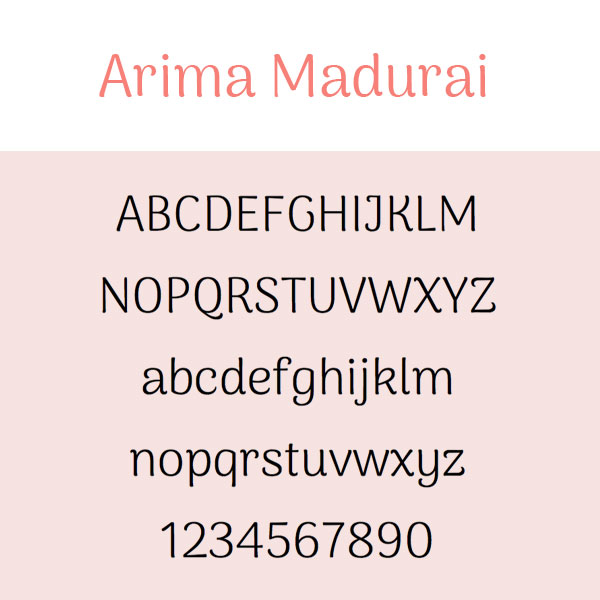
Arima Madurai would make for some very precious body copy text. It’s slightly whimsical yet very neat. Do you have a free guide that you give to your clients? Freshen up the design with Arima Madurai!

15. Vast Shadow
I love Vast Shadow! This font is flashy and dimensional. It’s perfect for big headlines that need to give off the WOW factor. To preserve the 3D-like effect that this font gives off, I would recommend placing it on top of either a solid or very transparent type of background.

16. Flamenco
You say Flamingo, I say Flamenco. This font is ultra cool. It’s fairly thin so I’d suggest using Flamenco for body copy. Be sure there’s good contrast between the color of the text and the background in order to let this little gem shine!

17. Zilla Slab Highlight
Highlight all the beauty of boudoir with Zilla Slab highlight. This font looks amazing in every color of the rainbow! You can use it to draw major attention to your headlines or even sub-heads. Take the Slab for a spin!
18. El Messiri
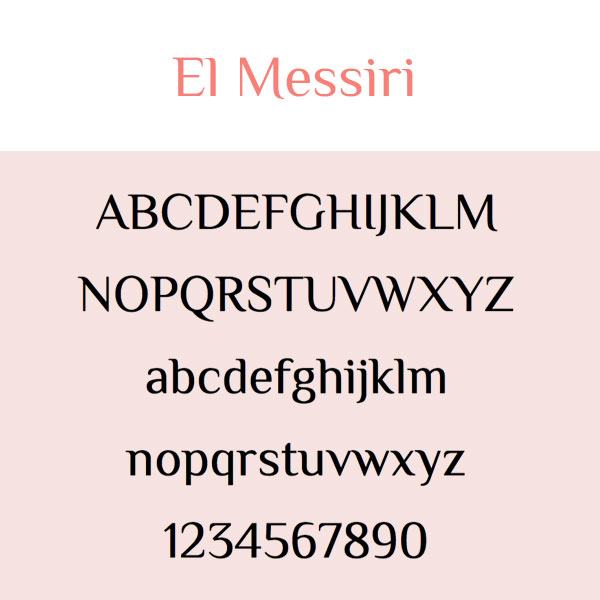
El Messiri is a pretty flexible font. Create a punchy sub-head using all caps or apply it to your body copy for that storybook kind of feel.Either way, I think you’ll have lots of fun with this one.

19. Crimson Text
Why use standard and boring fonts like Times New Roman and Garamond when you can be using a beautiful font like Crimson Text? It’s the little things that can totally upgrade the level of your marketing. Try Crimson Text for body copy text and see the difference.
20. Ruffina
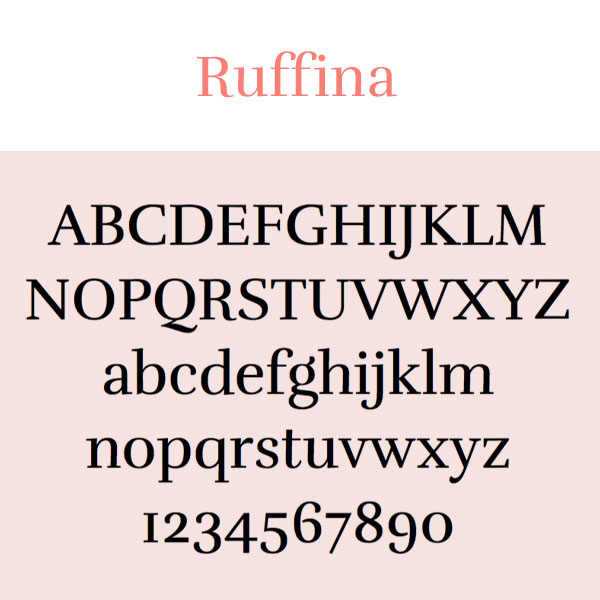
Ruffina is a gorgeous serif font that’s bold and extremely legible. There’s just something about it. Like the words in a juicy romance novel, any text written in Ruffina will leave you wanting more.
There you have it … 20 FREE Google fonts that will transform the look of your boudoir photography brand. Try ‘em and comment below with your feedback!
For more deets on downloading, embedding, or using Google Fonts, read this blog post: How To Explore & Download Google Fonts

How To Explore And Download Google Fonts
One way to really differentiate your marketing for your small business is to experiment with different fonts. Times New Roman, Arial, Garamond … those are the same old, same old. Everyone uses those. Did you know that Google offers over 900 font families that you can download and use for free? In this blog post, I’m going to teach you how to do this.

One way to really differentiate your marketing for your small business is to experiment with different fonts. Times New Roman, Arial, Garamond … those are the same old, same old. Everyone uses those. Did you know that Google offers over 900 font families that you can download and use for free? In this blog post, I’m going to teach you how to do this.
Why I love Google fonts so much.
Ok, so there are two reasons why Google fonts are completely awesome. First off, every font family in the massive library of fonts is open-source. What that means is you can download and use them any way you want … for free! Yipppeeeee!
Aside from the open-source licensing, another reason I love Google Fonts is because of the variety. The library offers a robust mix of beautiful styles that can be mixed and matched to suit any brand.
Sorting Fonts
Alright, now it’s time to take a trip over to the Google font library!
fonts.google.com
When you hit the Google Fonts main page, it will look something like this.

As you scroll through the page, you’ll realize there’s A LOT to choose from. Thankfully, you’re on a Google website and the search functionality is bar none.
On the right side of the screen, you’ll find a menu of options. This menu allows you to filter the collection based on a number of different criteria:
Categories
Serif:
In typography, a serif is a small line or stroke regularly attached to the end of a larger stroke in a letter or symbol within a particular font or family of fonts. A typeface making use of serifs is called a serif typeface. (Wikipedia) Times New Roman is an example of a serif font.
Sans Serif:
Typeface that doesn’t include the little strokes just mentioned above are referred to as sans serif fonts. Arial is an example of this.
Display:
A display typeface is a typeface that is intended for use at large sizes for headings, rather than for extended passages of body text. (Wikipedia)
Handwriting:
A handwriting font is just what the name suggests … a font that looks like handwriting!
Monospace:
A monospaced font (opposed to a proportional font) is a font whose letters and characters each occupy the same amount of horizontal space. (Wikipedia)

Image from Wikipedia
Sorting
Using the Sorting filter, you can view font families based on what’s currently Trending or the most Popular fonts. You can also filter by Date Added or put the fonts in Alphabetical order.
Languages
The majority of Google fonts are in English but there are font options in several other languages as well.
Sliders
The sliders in the filter menu are very cool. There are sliders for Number of Styles, Thickness, Slant, and Width. By moving the slider to the right on any one of these options, you’ll be presented with fonts that represent more of the particular characteristic you’re filtering. (For example, if you moved the slider all the way to the right on the Thickness option, you’d see the thickest fonts in the library.)
A Note about Number of Styles:
Some fonts are offered in varying styles. For example, the font Arima Madurai is offered in eight different styles ranging from Thin all the way to Black. Depending on how you’ll be using a font, you may want to consider downloading multiple different versions of it.

Choosing Fonts
The Google font library, even with its amazing filtering capabilities, can be a tad overwhelming. How does one choose a font with all of these incredible options?! Well, my advice is to explore the library and click on the fonts that speak most to you (and, of course, speak to your small business brand). I personally have a thing for sans serif and handwriting style fonts. 🤓
If you click on a font that you like, you’ll be brought to a details screen, which looks like this:

In this example, I had clicked on the font called Satisfy. The details screen shows all of the characters in the collection and even lets you type in sample text so you can see what different words or phrases will look like written in the font!
To view sample text, simply click where it says “Click here to preview text.” (This is found in the middle of the page underneath Styles.)
After you type your text, you can use the red slider to change the size of it. In my example, I bumped the point size up to 90 so I could see what my text would look like as a big headline. 🍍😊

On the left side of the screen, you’ll see a menu of fonts that will pair nicely with the font you’ve selected. By clicking on any one of these options, the paragraph text to the right of it will change to that particular font. It’s a great way to see how other fonts will coordinate with your selected font … which helps narrow your search, too!

How To Download Fonts
Once you’ve selected a font that you like, you can go ahead and add it to your collection to download! To do this, simply click the little red plus icon. (It will be at the upper right corner of the details page or to the right of each font listed on the main page.)
Each time you select a font, it will be added to your collection. The collection will remain in an expandable box at the bottom right of the page as long as you have fonts selected. To access your collection, click the minus sign on this expandable box.
When you expand the collection, it will look something like this:

To download the font(s) in your collection, simply click the icon that looks like a down arrow with a horizontal line underneath it (it’s in the top right corner of the box). A zipped folder will then be downloaded to your computer.
If you’re on a Mac, you can double click the zipped folder to unzip it. Then open the unzipped folder and double click the font file. This will trigger your Font Book to open. Click Install Font and BOOM! The font is installed and ready for you to use!
Happy font browsing! Comment below and let me know what you download. :)
Need a small business brand identity?


How To Make A Mood Board On Pinterest
Mood boards can be incredibly helpful in the website and branding design process. In this blog post, we’re going to explain the benefits of creating a mood board and how you can make one using Pinterest.

Mood boards can be incredibly helpful in the website and branding design process. In this blog post, we’re going to explain the benefits of creating a mood board and how you can make one using Pinterest.
What’s a mood board?
Remember back in the day when you used to make those colorful collages out of magazine clippings? You’d forage your favorite publications for photos, words, or quotes that inspired you and then excitedly glue them to a poster board. Well, that’s the same concept behind a mood board!
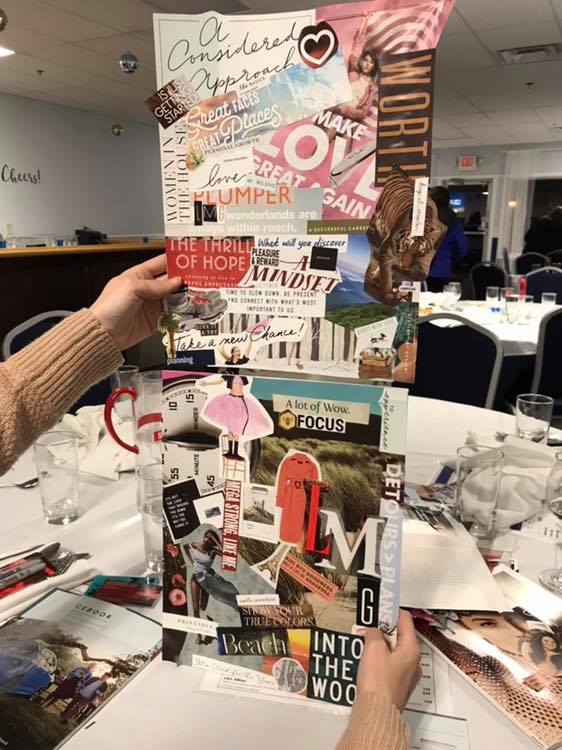
Me and Katie attended a networking event this month and we made old school inspiration boards. How did we do?
When we’re working with a website design or branding client, we have them make a mood board on Pinterest (which, by the way, is much easier than using magazines, scissors, and glue). When searching for images, we ask the client to keep their target buyer persona in mind and choose the things that would inspire them. Remember, when designing a website or brand, it’s more about what your target customer will like than about what you like. (However, if you and your target customer happen to like the same kinds of things, well … that’s even better! It makes creating your mood board a bit easier.)
How To Create A Mood Board For Branding Or Website Design
Step 1:
If you don’t already have one, write a clear and detailed description of your target buyer persona. This step is key! Again, your brand and website needs to resonate with this person. If you need help, we recommend reading HubSpot’s blog post: How to Create Detailed Buyer Personas for Your Business. In it, there’s a free Persona Templates Guide you can download.
Step 2:
If you’re a creative entrepreneur, chances are, you already have a Pinterest account. If you don’t, you’ll need one for this exercise! To do this, go to Pinterest.com and enter:
Your email
A password
Your age

(Note: You can also sign-up using your Facebook or Google account.)
Step 3:
Once you’re logged in, access your profile by clicking on your name in the top right corner of the screen. Then scroll down the page a bit and click on the Boards option that’s underneath your info. If you’re an active Pinterest user, you’ll see all of the boards you’ve already created here. If you’re new to Pinterest, this area will be empty.

Step 4:
Within the Boards section, click the red plus sign to Create Board. In the pop-up box that appears, you can name your board Mood Board (or any other fun name you can come up with). Then click Create.

Step 5:
Now it’s time to fill that board with all the things your target buyer persona would love! When you create a new board, Pinterest will offer up some ideas for it. You can search through those ideas or start typing words in the search bar at the top of the screen. (Note: searching is an easy task when you have a crystal clear description of your target buyer persona!)

As an example, we’re going to show you an actual buyer persona profile (below) so you can make the connection on how the details might affect your search.
Name: Carly
Age: 34
Location: Philadelphia, PA
Relationship/family status: Married (no children)
Pets: Boston Terrier
Education level: Bachelor’s Degree
Occupation: Interior Designer
Annual income: $90,000
Favorite Blog: Design Hunter, Eye Swoon, House of Brinson
Magazines or books: Anything Lisa Scottoline and the latest Pottery Barn catalogue
Hobbies: Sketching rooms/outdoor scenery, yoga, collecting art, and cooking healthy meals
Brands: Pottery Barn, RH, White House Black Market, Hello Fresh
Social media platforms they spend time on: Pinterest, Instagram
TV: Everything HGTV and Food Network
Based on Carly’s profile, here are the search queries we used to fill our board!
Philadelphia
Philadelphia Interior Design
Philadelphia Signage
Fruits
Vegetables
House of Brinson
Pottery Barn
Career Woman Quotes
Scenery Sketches
Artwork
Yoga
The most important part of Step 5 is: Do NOT overthink it! Search terms that are related to your target buyer persona and pin anything that stands out to you!
Here’s the board we came up with for our example buyer persona, Carly …
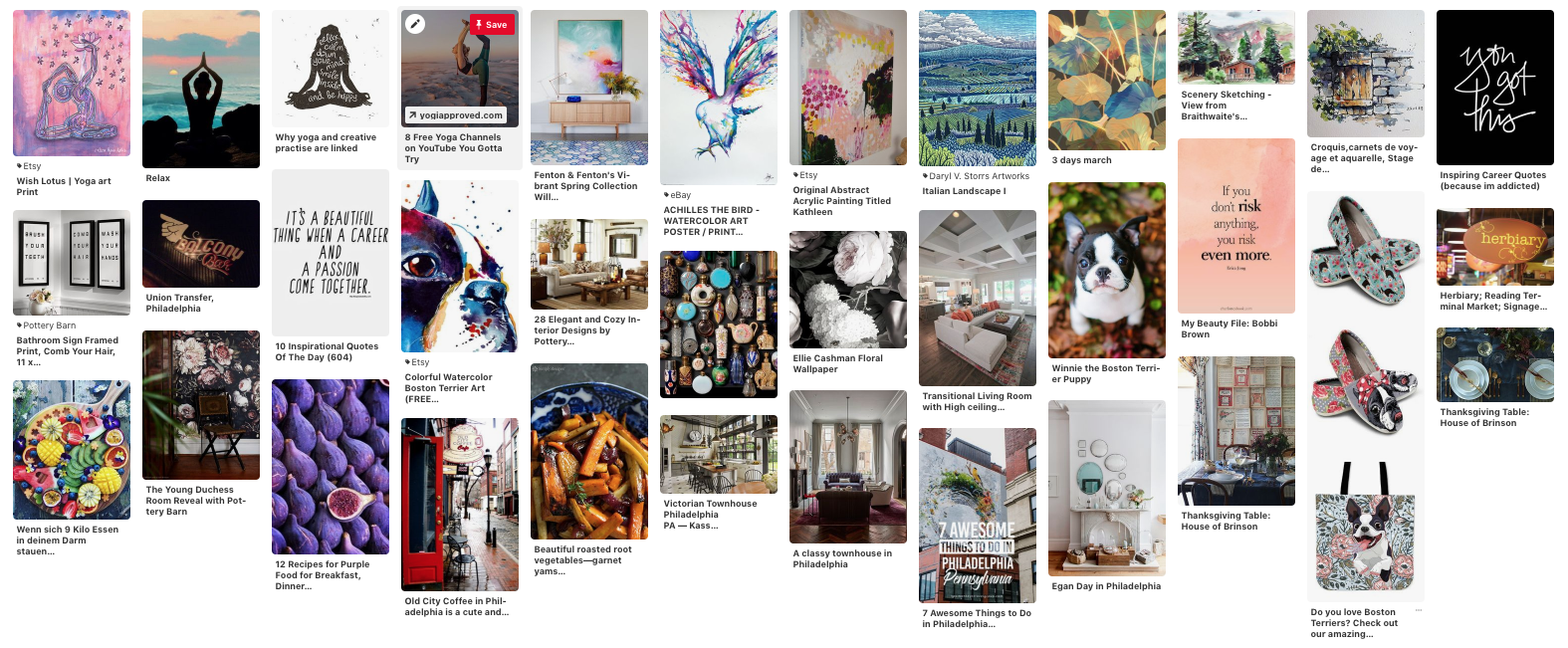
Take a step back and look at your mood board as a whole. Are there any common elements that stand out to you (i.e. colors, patterns, fonts, objects, etc.)? Jot them down because they can be incorporated into your website and/or brand design!
Step 6:
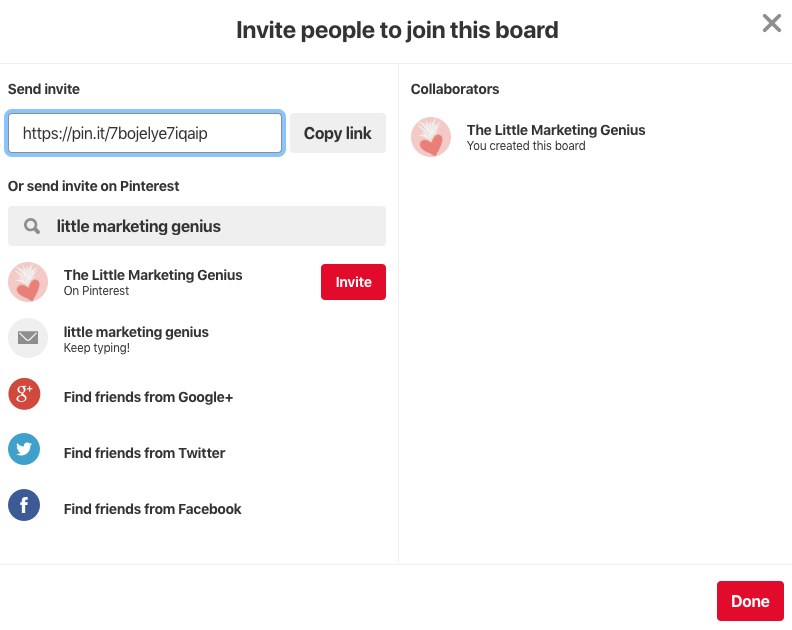
If you purchased a website or brand design package from LMG, you’ll need to share your mood board with us. To do this, go into your board and copy the URL from your web browser. Then, paste that URL in the Mood Board section of your Branding Prep Planner. (If you made your board secret, you can share it with us by clicking the little icon of a person with a plus symbol at the top of your board. Search Little Marketing Genius and then click Invite.)
Mood boards are super fun to create. And by building a board from the perspective of your target buyer persona, you’ll end up with a fantastic visual of what inspires them. Give this exercise a spin and comment below with your findings!
Looking to take your small business to the next level? We can help design a brand your target audience will love! Book a free 15-minute consult with us to get the process started today!
Creating A Small Business Brand From Scratch
One of my favorite types of projects is small business brand design. The creation of something sparkly and new … it’s very, very exciting! If you’re thinking about starting up a new venture or rebranding your current business, then keep reading! In this blog post, I’m going to share the steps I take to create a small business brand from scratch.

One of my favorite types of projects is small business brand design. The creation of something sparkly and new … it’s very, very exciting! If you’re thinking about starting up a new venture or rebranding your current business, then keep reading! In this blog post, I’m going to share the steps I take to create a small business brand from scratch.
Before doing a cannonball into the sea of fun stuff, the very first step in the brand design process is creating your buyer persona(s). Who exactly is it that you’ll be marketing your brand to? This is extremely important because the tone, style, and feel of your brand must … without a doubt ... resonate with that person.
Step 1: Create your buyer persona!
“A buyer persona is a semi-fictional representation of your ideal customer based on market research and real data about your existing customers.” -HubSpot
When creating a target buyer persona for your small business, here are some things you’ll want to identify:
Their name
Their age
Where they live
Their relationship/family status
Their education level
Their occupation
Their annual income
Websites they like / what blogs or YouTube channels they subscribe to
Magazines or books they like to read
Podcasts they listen to
Their hobbies
Brands they like
Social media platforms they spend time on
TV shows they watch
When writing the profile for your persona, it’s important to get as specific as possible. When you’re crystal clear on who it is you’ll be marketing to, the marketing part becomes a whole lot easier!

Need help completing this exercise? Download our free client persona builder!
Once you know exactly what your dream client looks like, you’ll never make the mistake of taking on (or marketing to) a nightmare client again. Download our FREE Client Persona Builder tool today.
After your target buyer persona has been developed, read the profile over a couple times. You’ll want to have your character front and center in your thoughts as you move through each of the next phases in the brand design process.
Set The Mood
I begin every small business brand design project with a mood board on Pinterest! Remember back in the day when you used to make those colorful collages out of magazine clippings? You’d forage your favorite publications for photos, words, or quotes that inspired you and then excitedly glue them to a poster board. (Yeah, I deeply miss the days before technology took over everything. 😭) Well, think of a Pinterest board as that old school poster board!
Create a new Pinterest board and, keeping your target buyer persona in mind, start searching for all the inspiring things. It literally doesn’t matter what it is. If you see something that you think would strike a chord with your buyer persona, Pin it to that board, baby! Pin until your little heart’s content.
Pin all the inspiring things!
When you feel like your board is filled with awesomeness, take a step back and look at it as a whole. As you scroll through and relish your Pins, make a list of any themes that stand out to you ...
Colors
Font styles
Objects
Words
Shapes
Etc., etc.
If you see any patterns on your board, be sure to write them down!

Side Story:
I love interior design. All my friends know this and often seek my advice on decorating their homes. A few years ago, my friend Kim was struggling to decorate her townhouse. She would go to Homegoods, for instance, and try to find things that all matched a certain color palette she thought she wanted. When she got the stuff home, she realized that she hated it and would then return everything. It was a vicious cycle.
One day she was sharing her style struggles with me and I gave her this advice:
Just buy the stuff you like and don’t overthink it. It will all come together because it’s your style.
I’m going to give you this same advice for your Pinterest board. Pin all the things you think your buyer persona would like and don’t overthink it. You’ll be amazed at how everything does in fact come together and the unique themes that will be born from it. It worked for Kim and it will work for you, too.
Picking A Color Palette
I freaking LOVE this part of the brand design process! Picking a color palette gives me immense joy … I’m very weird like that. Here’s how I suggest you do it.
Scroll through your Pinterest board and find one picture that totally stands out to you. A photo that gives you a fantastic vibe when looking at it. Save the photo on your computer and then head on over to the HTML Color Codes website.

Click the blue Upload File button and upload the inspirational image you just saved. As you hover your mouse over different areas of the photo, you’ll see the swatch in the upper right section of the box start to change.
In my example, I want to choose an orangey-pink hue from that beautiful bouquet.

Click on a color you like and, voilà! You’ll see the HTML color code for it appear in the lower right section of the box. If you see a hue within the color swatch that you also like, you can click directly on it to get the code.


Go through your image and select five or six colors from it. Be sure to jot down the HTML color codes for each.
(Pro Tip: I like to type my codes into a Note so I can easily copy and paste them when needed.)
Here are the colors I picked from my photo:
#FB4448
#D0C6E1
#EBE1DF
#179151
Next, go to Canva.com. Canva is a free online tool for creating graphics. If you don’t already have an account, you’ll need to set one up. I use the free version of Canva all the time and highly recommend it! (There’s a paid version that offers more features if you’re interested!)
Once you’re in Canva, click the Create A Design Button and then choose Instagram Post. We’re going to make 1080x1080 pixel swatches of the colors we picked out of our inspiration photo! To do this, click the Elements button on the left side menu and then type Square into the search box. Click on any solid (Free) square image that you want.


The image you choose will appear in the white box. Resize the square so it fills the entire white space. Then click the little square color swatch that is sitting above it. A menu will open and you’ll want to hit the + option. This will allow you to change the color of the square to one of the colors you selected from your inspiration photo. All you have to do is enter one of the HTML color codes you jotted down and the box will magically change to that color!


Next, click on the Text button in the left side menu. Click on Add A Heading and a text box will appear in the middle of your color swatch. Click into that text box and type the HTML Color Code you used to make that swatch. Think of this step as creating those paint swatches you’d get at Benjamin Moore. (If you want to get really geeky (like me 🤓), you can also make up a name for your color.)

Click the Copy Page icon in the upper right (it looks like two pages overlapping each other) and repeat the process above for all of your colors! (Just click on each design element to make your changes to it.)

When you’re finished making all of your color swatches, go ahead and download them to your computer. Click the Download button that’s at the very top right corner of the screen, then choose Download from the menu. For File Type choose .jpg and for Select Pages choose all your pages. Click Download.
A zip folder will be created of all your images. You can unzip the folder and save the images to any location on your computer.

My Palette


Designing A Logo
Now that you officially have a color palette, you can move onto the logo design phase. In this section, I’m going to teach you how to design a simple logo using Canva. Before we get started, let’s quickly review the elements of a good logo:
Simple and timeless works best.
Logos with overlays and background imagery do not translate well across different printing applications. Your logo should be versatile and have the ability to be placed on a variety of back drops without losing its integrity.
Ok, now it’s time to jump back into Canva. Click on Create A Design and then choose Logo. I like to start with the text and then build my other design elements around it. So go ahead and click the Text option in the left side menu, then click Add A Heading.

Replace the placeholder text with your business name by simply clicking into the text box, deleting the placeholder, and typing in your business name.
If you look above the canvas, you’ll see a white menu running across. The very first option is fonts. With your text highlighted, play around with some different font styles until you find one you like the best. (Note: Think back to your Pinterest inspiration board. Was there a font style that stood out to you? Try to pick something similar!)

There are MANY fonts to choose from so take your time and have fun with this step however, do not overthink it! Just make sure that whatever font you go with is easy to read. (Think about scaling it down to business card size. How would it look?)
To change the color of your text, highlight it and then click on the A icon in the top menu. Click the + and then enter in one of your HTML Color Codes.

Moving along to adding some design elements (This step is optional. If you want your logo to just be plain text, that’s totally cool).
Click on Elements in the left side menu and go crazy ... but not too crazy. I recommend sticking to basic shapes and lines; nothing too intricate.
As you add your design elements, you can resize them and change the colors using the same steps we used for making our color swatches. Be sure to stick to the HTML colors in your palette.
Tip: If you need to arrange elements behind or in front of one another, click on Position in the top menu and choose either Forward or Backward.

After you’re done creating your masterpiece, download it as either a .png or .jpg file. (If you want to preserve transparency, you’ll have to upgrade to a paid version of Canva.)
BOOM! You officially have a brand design!


Make sure you create a branding doc that outlines all of your HTML Color Codes and fonts so you can always have it for reference.
Finally, one last thing to mention: HTML colors are for the web. If you plan on printing your logo/colors, you’ll need the equivalent PMS color codes. (PMS stands for Pantone Matching System.) To get these, visit Code Beautify. Enter each of your HTML color codes into the HEX field and choose 48 for the distance. Look through the PMS swatches that appear and take note of the one that most closely matches each HTML color. Add this info to your branding doc!
If you follow these steps to design your small business brand, hit me up and show me your design!
-J
Need help branding your small business? Let us do the heavy lifting!

Our 2019 Business Goals Revealed
Welcome to 2019! 🎊 We don’t know about you but we love being a business owners during this time of the year. A time when so many exciting opportunities are just waiting to be tapped into. Looking back at 2018, we can easily identify the things that worked for our business and the things that didn’t. Since we use this blog as a platform to share useful information with other creative entrepreneurs, we wanted to give you the countdown of discoveries we made in 2018 and how we’re using them to shape our business goals for this year.

Welcome to 2019! 🎊 We don’t know about you but we love being a business owners during this time of the year. A time when so many exciting opportunities are just waiting to be tapped into. Looking back at 2018, we can easily identify the things that worked for our business and the things that didn’t. Since we use this blog as a platform to share useful information with other creative entrepreneurs, we wanted to give you the countdown of discoveries we made in 2018 and how we’re using them to reshape our business goals for this year.
Discovery #5: Social media drives website traffic, NOT sales.
In reviewing our 2018 website stats, social media accounted for 24% of our traffic. However, we cannot link Facebook or Instagram to a single sale we made last year. In fact, the leads that were generated by social media turned out to be fairly poor. Considering the time investment we made in managing our platforms (not to mention the money we spent on paid campaigns), this was a complete bummer.
(To hear more about our frustrations with social media last year, check out this blog post: The Only Reason We’re On Instagram)
Goal #5: Network more.
So what did generate the most business for us last year? Good old word of mouth! If only we could hide behind our computers all day and not have to get in front of people though! Networking can feel uncomfortable but, unfortunately, getting out of one’s comfort zone usually leads to spectacular things!
That said, one of our goals for this year is to do more networking. And by networking, we don’t just mean attending Chamber events and things of that nature. We mean, talking about Little Marketing Genius Every Single Chance we get. Whether it’s during a pedicure or indulging in craft beer at a local brewery, if there’s a chance to plug LMG, we’re taking it!
Discovery #4: We need to streamline our processes.
One key thing we learned in 2018 was that some of the technology we had been using simply didn’t fit our business. The email platform we chose felt clunky. Our invoicing software didn’t do everything we wanted it to. And managing social media accounts was quite the process. The result: spending way more time than we needed to on battling technology!
Goal #4: Invest in technology.
During the last quarter of 2018, we began researching technology that would streamline our business processes. We’re happy to report that we believe to have finally found the right platforms!
Investing in technology can be frightening for a small business owner … especially when revenue is in flux. What we learned is that using the wrong technology can actually cost you in the end.
Discovery #3: People love our blog.
Our blog is by far the most popular section of our website. Nearly all of the leads we get from Google and other search engines are because of our blog.
Throughout the course of 2018, we published posts but our schedule was inconsistent. We hosted a Tuesday Tips series over the summer but then didn’t blog at all in September and October. (This was a huge mistake because the blog had gained so much traction from the Tips series!)
Goal #3: Consistently blog.
We preach it to you guys all the time but didn’t do a very good job of it ourselves last year. We’re a small agency so creating content for our business at the same time as creating content for our clients can be a challenge … but we are always up for a challenge.
For 2019, we’re committing to at least one blog post per week, every week. That’s a lot of content so if you have any suggestions for topics, please feel free to share them with us below! 👇🏼
Discovery #2: The struggle of reaching your target buyer persona is real … if you’re not 200% clear on who that person is.
When we launched Little Marketing Genius, we had a pretty good idea of the types of clients we wanted to serve. However, pretty good is definitely not good enough when you’re talking buyer personas. In order to reach the people you want to serve or sell something to, you have to know much more about them than a few basic demographics. It requires going deeper than that. What hobbies does this person have? What are their favorite brands? What blogs do they read? The list of questions goes on and on.
Last year, we came to the stunning realization of how important getting super specific on your buyer persona really is. We took on a handful of clients that were not a good match for us and we struggled getting in front of those who would be the perfect match.
Goal #2: Create a robust and comprehensive profile of our buyer persona and build a new marketing strategy around it.
We began the process in December and we’re almost finished building out our persona. The next step will be to interview the clients who most closely fit this description so we can learn even more. Building the right persona is an intense exercise to go through but well worth it in the long run. We wish we had gotten more specific on our persona sooner in the game but we’ll chalk it up to yet another learning experience.
Need help revamping your buyer persona? Check out HubSpot’s free Make My Persona tool!
Discovery #1: The riches are in the niches.
Ok folks, this is our biggest discovery of 2018. We first heard about the concept of niching down when we attended Inbound 2018, a conference hosted by HubSpot every year. One of our favorite marketing gurus, Karl Sakas presented a seminar on how to attract the right clients. As part of this, he talked about vertical specialization:
“Narrowing your focus allows you to build better project management workflows. Specialization helps you close more clients, since your success stories will all be highly-relatable within the industry.
Ultimately, specializing in a particular client industry gives you an edge. For your prospective clients, there are too many potential agencies out there - they want to narrow things down. Your agency can either stand out as experts in a narrow field, or fade into the sea of thousands of generalist agencies.”
Read Carl’s full blog post on vertical specialization here.
Now, while Karl only consults agencies, this concept can apply to most businesses. We found it to be compelling but drastically thinning out our pool of prospects just seemed too scary for us at the time.
Fast-forward to the end of 2018. We were taking a web design business course by Paige Brunton and she highly recommended doing the same thing. Her words: the riches are in the niches!
Goal #1: We’re niching down!
While we can’t share all of the details on this just yet, 🙊 we can tell you we’ll be making some big changes in 2019! We’re going to get laser-focused on who we serve and the types of services we provide. We started preparing in December and probably won’t be ready to roll them out until the summer of this year so stay tuned!
We can’t wait to see what the New Year brings. We hope you have exciting things in store for your business as well. Comment below if you want to share any of your 2019 goals with us!
Looking to revamp your website design and brand in 2019? Book a free consult with us!

The Only Reason We're On Instagram
This is a topic I’ve been eager to vent about for awhile now … so here goes! There used to be a time when I absolutely adored Instagram. No surprise, I’m a very visual person so I’m naturally drawn to beautiful photos. When I react or comment on photos that I like, it’s genuine. And, back in the good ole days, it would appear when other people commented or liked my photos, it was also genuine.
Fast forward to 2012. Facebook bought Instagram for $1 billion dollars. And since this time, the platform has transformed from a fun place to share photos with friends and followers to an overpopulated arena of fakers and bots. Now, I have no idea whether or not the Facebook acquisition had anything to do with this distressing turn of events however, I’m leaning toward it did.

This is a topic I’ve been eager to vent about for awhile now … so here goes! There used to be a time when I absolutely adored Instagram. No surprise, I’m a very visual person so I’m naturally drawn to beautiful photos. When I react or comment on photos that I like, it’s genuine. And, back in the good ole days, it would appear when other people commented or liked my photos, it was also genuine.
Fast forward to 2012. Facebook bought Instagram for $1 billion dollars. And since this time, the platform has transformed from a fun place to share photos with friends and followers to an overpopulated arena of fakers and bots. Now, I have no idea whether or not the Facebook acquisition had anything to do with this distressing turn of events however, I’m leaning toward it did.
Over the past year, I’ve seen a staggering increase in the number of bot-like comments on photos we post to our Little Marketing Genius account. Actually, I just looked back at our six most recent posts and a whopping FOUR of them have been commented on by bots. I’ve highlighted this ridiculousness below …

And what about those hashtags? Really? It was bad enough when you had to worry about simply coming up with quality content but now you need a hashtag strategy as well?! Heaven forbid you use a banned hashtag from the ever-evolving List of Banned Hashtags and get yourself blacklisted!
Read Katie’s Blog Post On How To Grow Your Social Media (Without Bots)
Now moving along to the most irritating thing I see happening on Instagram. The constant fluctuation in followers. People following your account in hopes you’ll follow them back and then, just as quickly, unfollowing you. It’s absurd! Honestly, what happened to the days of following accounts because you were genuinely interested in the content?
So with all of these grievances I just shared, you’re probably wondering why the heck we’re still using IG. The answer is quite simple: because it’s a necessary evil (just like Facebook 🙄).
The bottom line is we live in a world where being on social media legitimizes your business somehow.
I’ve been to networking events and marketing conferences where people don’t even pass out business cards anymore. Instead, they share their Instagram handle. And if you don’t have a handle to share with them … well, CLEARLY you’re not a professional.
The only reason we’re on Instagram is because, as a business, we have to be.
Do new leads come flooding in every time we publish an Instagram post? Nope. Do we close more business because we’re on Instagram. Definitely not. Does Instagram help support and build our brand. Absolutely! Not to mention, it’s provides another avenue for us to share helpful content with you guys! And for that reason, we’re here to stay (for the time being anyways).
Now I’m not saying that Instagram can’t be a main lead and sales driver for a business. What I’m saying is that for most small businesses, it just doesn’t work that way. Unless you’re an influencer or know the secret for regularly developing viral content, chances are, your small business is not going to explode just because of Instagram. Social media typically plays a part in your online marketing success but does not define it. It does, however, serve to compliment your other marketing strategies such as blogging and content creation.
Wow! I’m feeling much better now that I got all that off my chest! I’m curious, what are your thoughts on Instagram? Have you found success or do you feel frustrated most of the time? Comment down below!
Looking to revamp your marketing efforts in 2019? Do you want to take a more comprehensive approach that ties your social media into other marketing strategies? Click below to book a free consultation with us today!

Small Business Website Design Packages
Take a look at your website. Do you love what you see? Do your visitors love what they see? Think of your website as another face of your company. If it doesn’t represent your style and brand then it’s time for a change.
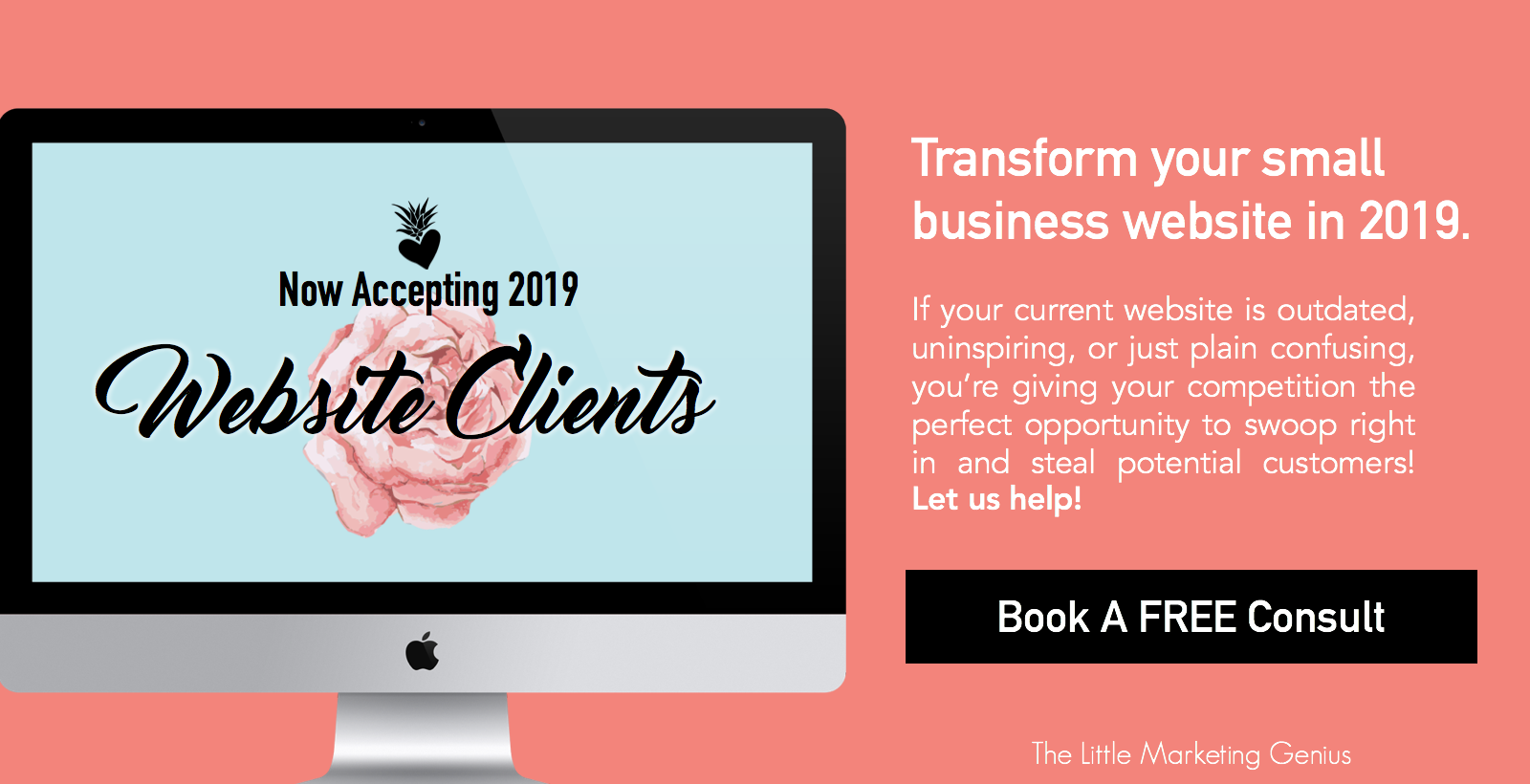
The Little Marketing Genius is now accepting new 2019 website clients!

Take a look at your website. Do you love what you see? Do your visitors love what they see? Think of your website as another face of your company. If it doesn’t represent your style and brand then it’s time for a change.

We’re Now Accepting 2019 Website Clients
If your small business website isn’t where you want it to be, make 2019 the year you invest in transforming it. It will be worth every penny … that, we can promise you. We’ll collaborate with you to ensure your new website accurately and professionally reflects your small business. Using eye-catching imagery, clean white space, and creative copywriting, we’ll bring life to your brand online. And we’ll help you incorporate lead generation tools that will work for you 24/7.
Getting a visitor to your website is a big enough challenge. Keeping them active and engaged once they’re there … well, that’s a whole different story! However, with a balanced mix of great content, seamless functionality, and enticing CTAs, it’s absolutely possible. And together, we can make it happen.
If your current website is outdated, uninspiring, or just plain confusing, you’re giving your competition the perfect opportunity to swoop right in and steal potential customers. Let us help!
The Process
Working with us is not the typical agency experience. We’re focused on small business owners who find value in professional marketing. We’ll get to know you and your business so we can build a site that’s perfect for you.
It all begins with a FREE 15-minute consultation. We’ll take a look at your current site and together we can begin the process for making it so much better. From there, we’ll:
Create or update your brand image if needed
Determine the design and functionality elements that you want
Plot out keywords that will help your site rank in search results
Strategize how and where call-to-action buttons will be used
Develop a plan for blogging if desired
Make recommendations for opt-in gifts or downloadable content
Construct a project plan
Build and launch your dream website!
We offer solutions that fit your needs.
The Packages
Just like every small business, each small business website is unique! We offer two different packages based on what you’re looking to accomplish. Purely Pineapple (a maximum of six pages) is our most basic package. Need branding and copywriting, too? Our The Pina Colada is the package for you.
NOTE: If you pay in full for either of these two packages, you’ll receive a 5% discount! For up-to-date pricing, please visit our Web Design page.
If you need something that’s not included in one of our two packages, take us up on a free 15-minute consult so we can gather the information we need to prepare a custom proposal for you.
Is working with The Little Marketing Genius right for me?
We understand. A website is a big investment for a small business … and one that should be taken seriously. So how would you answer these questions?
Do you place great value on having a beautiful website that your visitors will love?
Are you willing/able to invest at least $2,000 for the project?
Would you make it a priority to submit feedback and/or necessary content that we need from you while designing your website?
Are you excited to get this party started?
If you answered Yes to all four of these questions then, YES … we’ll make a perfect fit!
Don’t let another minute pass of being dissatisfied with your website. Book your free consult with us today!

Our Branding Shoot! + The 8 Things We Did To Make Our Session And Photos Totally Awesome
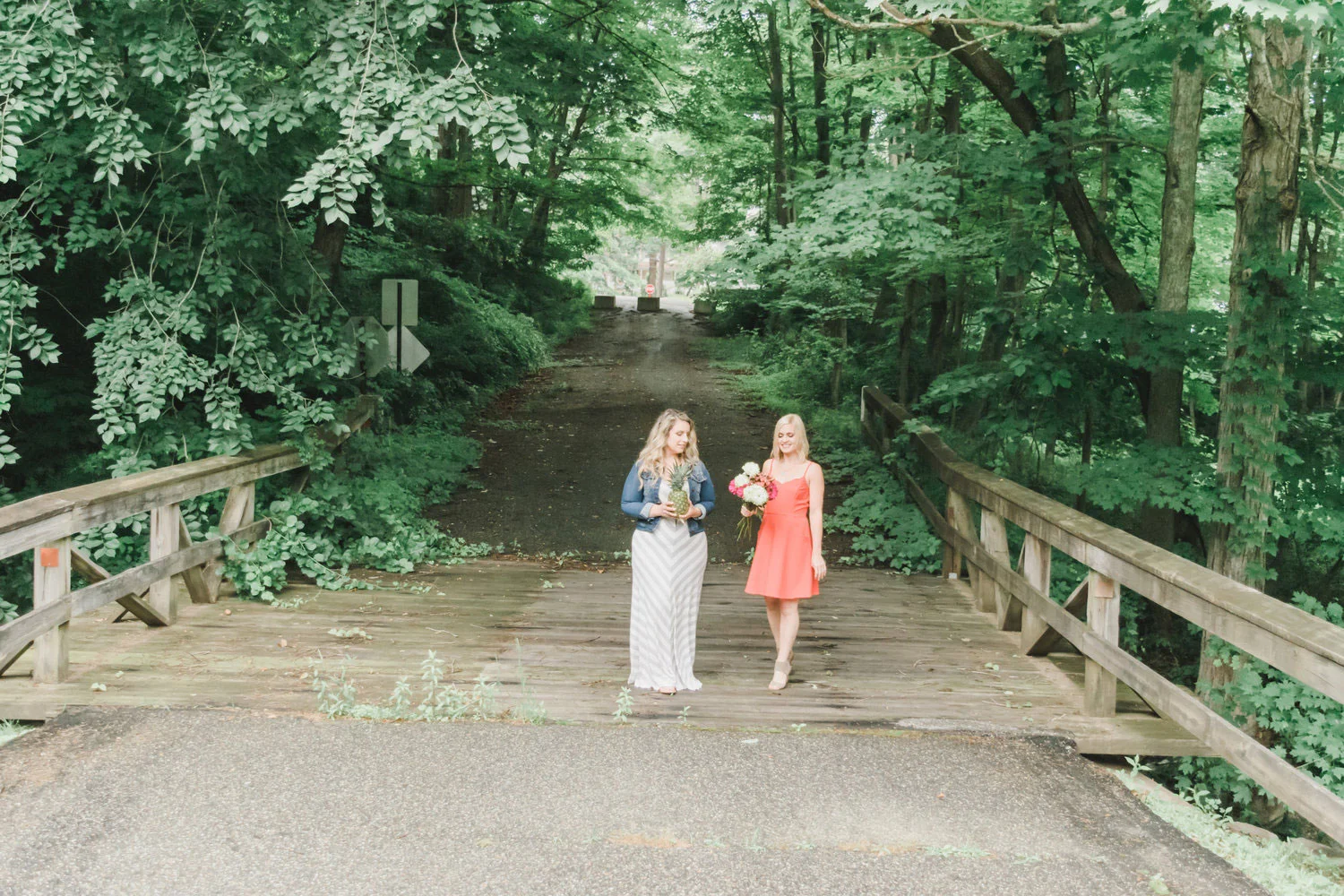
Our friend Audra (of Audra Nicole Photography) did our branding photo shoot last month and we are beyond excited to finally share the pics with you! And speaking of sharing, we’ll also divulge eight things that we did to make our session and photos totally awesome! Keep reading …

Earlier this summer, me and Katie decided to book a branding photoshoot. We were in need of fresh content for our website, blog, and social media channels so we thought, what better way to liven up our library?
Our friend Audra (of Audra Nicole Photography) did our shoot last month and we are beyond excited to finally share the pics with you! And speaking of sharing, we’ll also divulge eight things that we did to make our session and photos totally awesome!
1. Hire a professional.
Ok, so in our opinion, this is the most important piece of advice we can give someone who’s interested in doing a branding shoot. Hire a professional! It will make a world of difference. A professional photographer not only has the equipment, technology, and know-how for taking high quality pictures but they’ll also be able to guide you on styling, posing, and everything else that’s involved with capturing incredible images!
2. Listen to said professional.
A professional photographer will know how to stage the shoot and position you in ways that the camera will love. Listen to the photographer. When they tell you to “lean in” or “don’t fake smile” or “stand at an angle,” just do it. Don’t waste time questioning their approach. If you hired a professional who you trust, then trust in their process!
3. Be yourself.
I will be the first to admit … participating in a photo shoot can feel a bit awkward (maybe even a little intimidating) if you’re not used to doing it regularly. During your shoot, try to push those feelings aside and focus on just being YOU. If you’re nervous and begin to dwell on that nervousness, it WILL show in the photos. Take a breath (and perhaps a few sips of Prosecco) and just go with the flow.

4. Flatter your features.
When picking out clothing for the photo shoot, opt for colors and fits that flatter your figure and make you feel comfortable. According to Audra, “Choosing flattering silhouettes and colors that complement your natural features is the best way to ensure you’ll love the way you look in your photos.”
5. Carefully consider your hair and makeup.
Hiring hair and makeup professionals is a spectacular idea if you’re scheduling a branding shoot. Due to time constraints, me and Katie did our own hair and makeup for this shoot. However, considering it was lightly misting the entire time, I suppose we saved some money because the humidity took its toll very quickly. Ugggghhh. (My hair was actually quite wavy when we began!)
6. Utilize props.
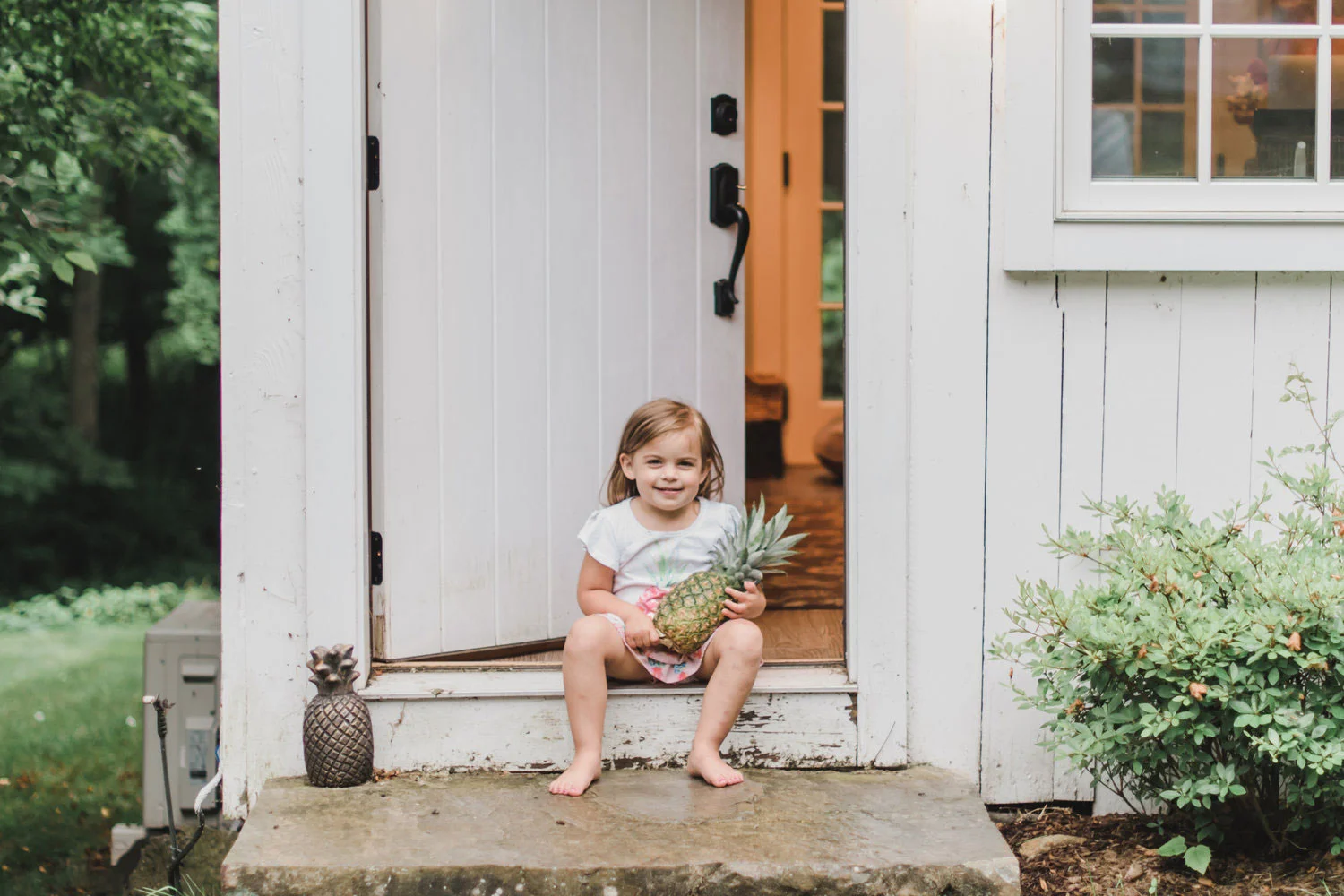
A branding photo shoot is all about expressing the personalities behind your small business in a fun and visually impactful way. Our shoot took place in the English garden behind LMG headquarters so we incorporated fresh cut flowers as a way to add additional color pops in the pictures. And OBVIOUSLY we worked in a pineapple, too!

7. Pick the perfect location.
Again, your branding photos are meant to tell a story about your small business. The location you choose for the shoot should have meaning and accurately represent what you’re all about. If you don’t have an office or store-front, consider iconic spots in the town or city you do business in. For example, when we first launched LMG we did a photoshoot on the boardwalk in Middletown at sunset. The bridge served as a backdrop behind us, which spoke directly to our primary service area of Middlesex County.
8. Color coordinate.
If you’re going to have multiple people in your branding photos, coordinate your outfits in a way that will create visual interest in the pictures. Audra recommends dressing in lighter, muted tones.
“The camera loves shades of soft pink and muted blues, mixed with sophisticated light neutrals like heather gray, creams, leather brown and white. That softer color palette fits into almost all natural outdoor environments.”
Audra also suggests that each person in the photo “have their own dominant color while still incorporating a few touches of the other colors that will pull all the looks together.”
We hope we inspired and prepared you for a small business branding shoot! Now, without further adieu, here's a sampling of our favorite photos!









Tuesday Tip #9: Establish Branding Guidelines
LEARN HOW TO CREATE BRANDING GUIDELINES! Your brand represents the personality of your small business. In order for people to easily make the connection between your company and your marketing, there needs to be consistency. Just think about how the big brands do it. …

Brand style guide:
“A reference tool that helps maintain consistency by demonstrating what a brand looks, feels and sounds like.”
Your brand represents the personality of your small business. In order for people to easily make the connection between your company and your marketing, there needs to be consistency. Just think about how the big brands do it. Take Starbucks for example.
Starbucks’ mission:
“To inspire and nurture the human spirit - one person, one cup and one neighborhood at a time.”
If you’re a Starbucks fan like me, then you know they’re pros at delivering on this mission statement. No matter which Starbucks coffee shop you visit, the brand is expertly tied into the overall experience. You know what to expect. Funky music. Overpriced beverages that taste oh so good. Spots to plug in your electronic devices. Baristas who speak your lingo (Venti Iced Skinny Decaf Hazelnut Macchiato). Some may call it obnoxious. Others refer to it as pure bliss. Regardless, Starbucks has mastered the art of marrying their mission statement to their marketing and branding.
“From the atmosphere in their stores, to their digital content, to their advertising, everything looks, sounds, and feels like Starbucks. Even the cups and tumblers you can buy in the store have a clean, modern design to them. The result? The experience you have with Starbucks always feels consistent, whether you’re reading a social post, waiting in line, watching a TV ad, or interacting with their brand in any way, anywhere.” (CoSchedule Blog)

So now let’s bring this back to YOU. How can you translate the Starbucks branding strategy to your own small business? It all begins with branding guidelines.
“Think of your brand identity as your company’s personality. It’s how the world recognizes you and begins to trust you. If you see someone change how they look and act all the time, you won’t feel like you know who they are, and you certainly wouldn’t trust them.” (99Designs.com)
Creating a branding guidelines document is really quite simple. Like Starbucks, you’ll want to build it around your mission statement. If you’re solid on the promise you’re making to your audience, the colors, messaging, and style will all flow from there.
There are seven key components that you’ll want to consider including in your branding guidelines:
1. Your Story
Here’s where you can put your mission statement in writing. Have a vision? Include that as well. Your brand guidelines document should begin with a short story about who you are as a small business and what you represent.
2. Target Audience
In the world of Inbound Marketing, we like to call these personas. Who are the audience members that you’re trying to reach in your marketing? Think about it and describe them in detail. (For help with this exercise, check out this blog post by HubSpot: How to Create Detailed Buyer Personas for Your Business)
3. Logo
Your branding guidelines document should include a visual of your logo and every acceptable variation of it. For example, the Little Marketing Genius logo is black and pink. However, if we were printing it on a black tote bag, well, the black parts of the logo wouldn’t work so well. So in cases like this, we convert the text and pineapple leaves to white. All of this type of information needs to be outlined in the logo section of your branding guidelines document.

4. Colors
What colors define your brand? Going back to our Starbucks example, green is a prominent color that’s used in pretty much all of their branding.
List out the colors that are not only used in your logo, but the colors you would use in general marketing and advertising as well. The Little Marketing Genius uses soft pastels. (You can check out our website to see how the palette gets incorporated throughout.)
When creating the Colors section of your brand guidelines, include swatches of each color along with their respective codes:
Color match: PANTONE name and number
Print color: CMYK
Digital color: RGB and HEX codes
This will make referencing them much easier in the future.
5. Fonts
Again, you’ll want to define the fonts used in your logo as well as the different fonts that are used in your marketing and advertising. Specify how and when fonts are to be used. For example, what’s the size and spacing standards for headlines and subheads? How about body copy?
6. Imagery
Examples. Examples. Examples. Curate imagery in the form of a mood board! “Collect images that convey the feeling that you want people to get when they interact with your brand.” They will represent the appropriate styles of imagery that should be used in both printed and online marketing. (99Designs.com)

7. Voice
What tone does your messaging have? Witty? Casual? Extremely serious? By deeply understanding your target audience, you’ll know exactly what tone is appropriate to use. The next step will be to describe it within the Voice section of your branding guidelines. Provide examples of different words that you might use as well as some examples of words you would never use. Establishing your voice is key to creating consistency within your messaging and branding.
Now to unveil an awesome surprise!
HubSpot has a free kit that you can download to help you create your branding guidelines. It has everything you need to go from same-old business to must-have brand! Click here to get the kit!
We hope you found today’s Tuesday Tip helpful! For more marketing advice like this, be sure to scroll to the bottom of this page and subscribe to our blog!
Every Tuesday we share easy and actionable advice you can take to refresh your current marketing plan. Follow us on Facebook and Instagram to see more!
#LMGTuesdayTips

How To Run A Successful Fundraising Campaign: Bubbles For Madden Case Study
Do you remember your first lemonade stand? Perhaps you might better remember your first catalog fundraiser selling wrapping paper and pies? Whether you had your eye on a Cabbage Patch Doll at the store or were raising money for that year’s school field trip, there was an ultimate goal that drove you to make the most out of your campaign.
In this case study, I'm going to share the key elements to running a very successful fundraiser and achieving your campaign goals.

Do you remember your first lemonade stand? Perhaps you might better remember your first catalog fundraiser selling wrapping paper and pies? Whether you had your eye on a Cabbage Patch Doll at the store or were raising money for that year’s school field trip, there was an ultimate goal that drove you to make the most out of your campaign.
In this case study, I'm going to share the key elements to running a very successful fundraiser and achieving your campaign goals.
INTRO
It’s pretty safe to say that fundraising is a simple concept and one that we learn at a very young age. As we grow older, the concept remains the same but the purpose behind each campaign is likely to become a tad more complicated than purchasing the latest trend at the toy store or exploring the local children’s museum.
When you think of fundraisers as an adult, what is your initial thought? Probably something like a 5K to raise money for Breast Cancer research or maybe a car wash for your daughter’s cheerleading squad to buy new uniforms.
You see, regardless of the goal, fundraising is a pretty basic concept. But what really sets one fundraiser apart from the others? You guessed it. Marketing. How are you going to move people to hand over their hard earned money to support your cause?
In today’s world, fundraising is very easy to do online. You can set up a Go Fund Me Page and Facebook is an excellent tool for spreading the word. You can, of course, keep it old school and hit the pavement … waiting outside grocery stores or leaving jars at the local donut shop. Whichever avenue you wish to take, are you giving thought to your target audience? Are you really maximizing your efforts to yield the greatest results?
I have participated in my share of walks for Alzheimer’s, Breast Cancer research, and eating disorder support. All of which I raised a modest amount of money for by doing minimal amounts of posting online or just talking about it with people during coffee breaks. Nothing spectacular but every little bit helps. I never gave it much thought until I created a fundraiser of my own for a cause that was extremely important to me.
MADDEN
My senior dog, Madden, had been diagnosed with several ailments … one of which was a cancerous growth on his spleen. At the time, it was recommended that the growth be removed and that the other diagnosed conditions be continuously treated. He also would need weekly physical therapy.
I know everyone’s feelings towards their dogs is different. Everyone makes the personal decision as to what level they are willing to go for their dog and how much money they are willing to spend. You see, Madden was my best friend. He had been by my side for the last 12 years. He walked me down the aisle at my wedding. He welcomed our daughter into our home when she was born. He was my boy and I wasn’t about to give up on him based solely on financial constraints.
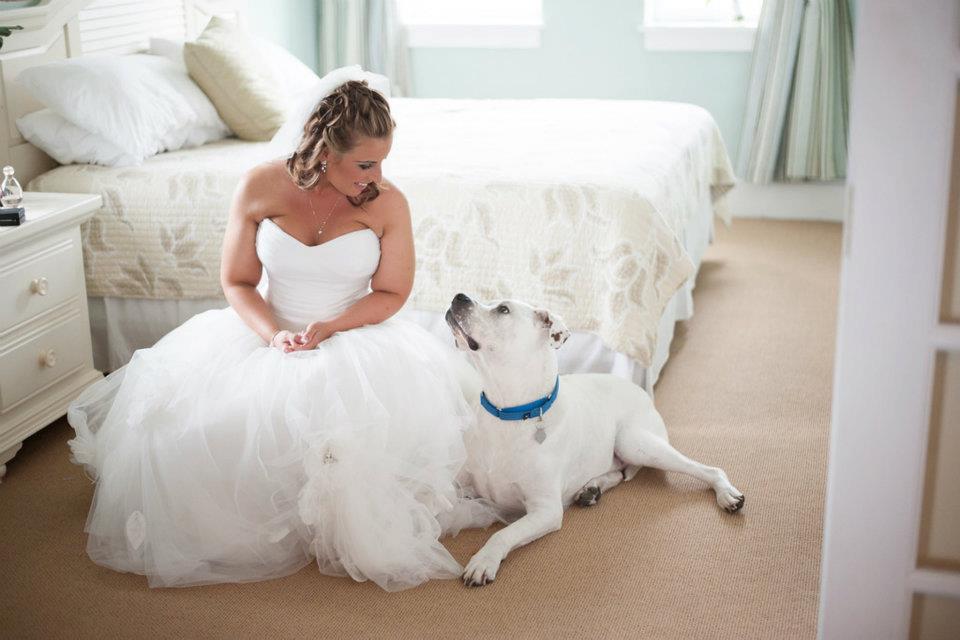
After the veterinarian gave me the estimate for the planned surgery and I calculated how much his continued supportive care would cost, I knew our family simply didn’t have that kind of money. However, I didn’t feel right about starting a Go Fund Me Page. I much preferred to raise money in a way where the people who donated toward Madden’s care would know they were getting something in return. This was how “Bubbles for Madden” was born.
#BUBBLESFORMADDEN
With the help of many supportive friends and professional contacts I had made over the years, I was able to orchestrate a fundraising campaign for Madden that included a dog wash and T-shirts.
First thing was first ... I needed a logo. Logos are not just for businesses or organizations. They are your brand. They tell a story. They make a first impression. I needed a logo for Madden’s campaign so I reached out on Facebook to any graphic designers who might be willing to design one for me. I was beyond thankful that my friend, now business partner, Jamie was so willing and excited to donate her services and create a logo for me!
Since the campaign centered around Madden, I wanted to incorporate his picture somehow. The end result was a logo that had personality … it was fun and, without a question, it was Madden. From a functional standpoint, it was clean and clear. Perfect for print and eye catching for social media.