

Blog Categories
Web design Branding Blogging Social Media Inbound All
We post weekly tips, tricks, and marketing advice to help grow your business.

Branding Your Boudoir Photography Blog
Earlier this week we published a new article on How To Design A Blog Post. While it’s important that your posts are interesting to your audience and grammatically correct, there’s another aspect of blogging that sometimes gets forgotten about. The design.
In Tuesday’s post, we shared tips for making your content shine by applying some simple design concepts. And, of course, that got us thinking about our core client … the boudoir photographer. In today’s post, we’re going to share nine design tips specific to a boudoir photography blog.

Photo by Jernej Graj on Unsplash
Earlier this week we published a new article on How To Design A Blog Post. While it’s important that your posts are interesting to your audience and grammatically correct, there’s another aspect of blogging that sometimes gets forgotten about.
The design.
In Tuesday’s post, we shared tips for making your content shine by applying some simple design concepts. And, of course, that got us thinking about our core client … the boudoir photographer. In today’s post, we’re going to share nine design tips specific to a boudoir photography blog.
1.) Coordinate your blog design with your website design.
Keeping in line with your brand is incredibly important. (FYI: This applies to everything you put out there, not just your blog.) The fonts. colors, and patterns that you use on your website should be incorporated into the design of your blog. Mismatched marketing leads to an audience disconnect and will ultimately stunt your brand recognition efforts. When visitors to your website hop over to your blog, or vice versa, they should feel like they’re still in the same space.
2.) Create a header.
According to the Brand Solopreneur:
“A header is the first thing a visitor sees when landing on your blog, so just like a bad piece of meat can ruin a dish, a poorly constructed header can squander a first impression.”
Your header should include your logo and also a clear, concise description of what your blog and brand are all about.
The Brand Solorpreneur also has this to say about creating a blog header:
“Be aware of what I call the ‘hotdog effect’ when designing your header. You do not want to put everything but the kitchen sink in there. Your header is a qualifier for visitors. It should tell them enough that they can make a quick determination if they want to learn more or leave.”
3.) Use pull quotes and big, bold headers to satisfy the skimmer.
Boudoir is a hot topic and there are many questions your future clients need answered. Make sure your blog posts are easy to skim. The main points of each article should stand out from the rest of the text, allowing the reader to get the gist of the post even if they don’t have time to read the entire thing.
In a study on how people read websites, the Nielsen Norman Group discovered that “79 percent of test users always scanned any new page they came across; only 16 percent read word-by-word.”
Needless to say, it’s important to highlight the main points of your post in order to keep people scrolling through the content!
4.) Use photography that identifies with your target client persona.
Your blog is the perfect place to attract new client leads. So make sure you’re doing what it takes to attract the right ones! People are visual by nature so imagery will play a key role in your blog design. While you’ll want to use photos that reasonably coordinate with the topics of each post, you’ll also want to consider whether or not the photos you select will resonate with the right people (a.k.a. your target client persona). Each time you go to select photos to use with your blog posts, keep your dream client in the back of your mind and ask yourself how each photo would make them feel. Would it appeal to them or be off-putting in some way? Again, your blog should be a lead generating tool. Get the right leads for your boudoir business by always keeping your target client persona at the forefront of your copywriting and design decisions!
5.) Promote your workbooks, guides, checklists, etc.
Do you offer a free guide, workbook or checklist to your website visitors or clients? Content offers like these should be promoted in every single one of your blog posts. Remember what we just talked about above. You need to treat your blog like a lead generating tool. If you’re not giving visitors an obvious way to opt-in to your content, you’re missing an enormous opportunity!
6.) Tell a story.
Boudoir photography is all about empowerment. Take a moment to think about just how many people’s lives you’ve touched. Just how many women you’ve made feel BEAUTIFUL. These stories are pure gold for your blog.
The art of boudoir photography is simply unknown to many people. Some might even think it’s scary or intimidating. However, seeing and reading about actual human beings who went through the experience can be a very powerful thing. Utilize your evangelists and ask to feature their stories and sessions on your blog!
7.) Include social sharing buttons!
If you’re a boudoir photographer, there’s a good chance you’re using various other social media platforms to promote your brand. Give your blog visitors an opportunity to easily share your fabulous content with their networks by including social sharing buttons within your blog posts.
8.) Be mindful of photo file sizes.
Like your website, your blog should feature high quality photos but be sure to keep each of them under 500KB. Filling your blog posts with extremely large photo files will seriously slow down page loading times. (And this is annoying 😩) Give your blog visitors a user-friendly experience so they stay around for a while!
9.) Make your content easy to search.
Whether you organize your posts by using categories and tags or simply offer search functionality within your blog, your content should be easy for visitors to sort through and navigate. (Pro Tip: Offering up a topic listing can definitely help lead people in the right direction!)
And there you have … nine tips for making your boudoir blog even more amazing than it already is!
Need a little help getting your boudoir photography blog off the ground.
Find out how we can help by requesting a free 15-minute consult today! We specialize in working with boudoir photographers just like you.

How To Design A Blog Post
Blogging is about more than just writing a wonderful piece of content that your audience will love. It’s about making it pleasing to the eye, too! It doesn’t matter how amazing your post is … if the page layout is distracting, confusing, or cluttered, your readers are going to bail. And what a shame that would be considering all of the time and effort it takes to create a post to begin with!
Today we’re going to share some tips on how to lay out each of your blog posts in an aesthetically pleasing way. Let’s hop to it.🐰

Blogging is about more than just writing a wonderful piece of content that your audience will love. It’s about making it pleasing to the eye, too! It doesn’t matter how amazing your post is … if the page layout is distracting, confusing, or cluttered, your readers are going to bail. And what a shame that would be considering all of the time and effort it takes to create a post to begin with!
Today we’re going to share some tips on how to lay out each of your blog posts in an aesthetically pleasing way. Let’s hop to it.🐰
Ok, we love data and statistics so let’s start things off with this little nugget:
“According to a recent U.K. survey, bloggers have ranked as the third most trustworthy source of information, following only friends and family. That's right -- bloggers are trusted more than celebrities, journalists, brands, and politicians.”
(HubSpot)
If you’re providing valuable content consistently, it’s inevitable … you’re going to create a following. (Yay!👏🏼) However, people are visual. If your blog posts are filled with annoying pop-up ads or offer little relief in the way of white space, visitors are not going to stay for long. (Boo!👻) The good news: You do NOT need any kind of graphic design skills to lay your posts out in a visually appealing way! Simply follow these tips and you’ll be golden!
Tip 1: White space is your friend.
Ever visit a blog or website that’s stuffed like a Thanksgiving turkey with text? Everywhere you look, all you see is words, words, and more words! Ahhhhhh! That’s a big ouchy for the eyeballs. 👀
The trick with laying out any webpage is incorporating white space so the content feels easy to read and absorb. Make sure there’s a healthy amount of white space in the margins of your page as well as between paragraphs.
Tip 2: Organize your content with headers and bullets.
Most of us love to skim. We’re all super busy people who are on the hunt for fast access to information! Yes, it’s every blogger’s dream that visitors will sit down with a cup of coffee and leisurely soak in every last drop of each post. News flash: This is NOT reality! The majority of people scan content.
In a study on how people read websites, the Nielsen Norman Group discovered that…
“79 percent of test users always scanned any new page they came across; only 16 percent read word-by-word.”
Keeping this in mind, be sure to break up your content using headers, sub heads, and bullet points wherever possible. This will make your posts significantly easier to scan and digest.
Tip 3: Be on brand.
The imagery and accent colors used in your blog posts should represent the look, feel, and style of your brand. You don’t need to be like Skittles and utilize every color of the rainbow. In fact, that’s a bad idea when it comes to blog post design. Keep your color palette a simplistic representation of your brand.
Now let’s talk about imagery. If you’re in the business of photography, then you can pretty much skip this paragraph because, by nature, you already have a plethora of fantastic photos to choose from. (And we’re very jealous of you.) However, if you’re like the rest of us, you probably need to make use of stock photography.
Stock photos are a great way to add visual interest to your blog posts IF you’re selecting the right kinds of imagery. Be aware, there are some incredibly cheesy free stock photos floating around on the Internet. There are also some extremely beautiful stock images that you can use 100% free!
Our favorite sites for free stock photos are:
There are also sites such as Shutterstock, Getty Images, and Adobe Stock that you can purchase very unique, gorgeous stock photography from.
One important thing to mention here is NEVER EVER take a photo from Google images without fully understanding what the licensing and copyright details are. (In most cases, these photos belong to someone else and you don’t have permission to use them.) Your safest bet for incorporating photography into your blog posts is using one of the stock photography websites we’ve referenced above.
Tip 4: Make your links obvious.
If you link to other websites or resources within your blog post, make sure the hyperlinks are obvious so the reader knows where to click in case they wish to learn more. We use an accent color for our hyperlinks.
We also like to have external links open in a new window. This way, our website will remain open while the person is exploring a link that takes them off our site. If they do more clicking from there, our site will still be open in another tab and be easy to get back to if they wanted.
Tip 5: Place your CTAs above the fold.
Many business owners use their blog as a way to capture new leads. Aside from grabbing actual subscribers to your blog, you can utilize CTAs (calls-to-action) to get readers to click and complete some type of form. The CTA can be to download a guide (that relates to your blog post) or request a free consult. Whatever the action is that you want the reader to take next, be sure you tell them early on in the post! Remember, people tend to scan web pages and they don’t always make it all the way to the bottom. Place your enticing CTAs above the fold or above the point where they’d have to scroll to see more of the screen.
Tip 6: Offer a way to search.
We’ve all become spoiled by Google. We see a search box, plug in a few words, and BOOM! We’re instantaneously presented with all sorts of results! Your blog should offer this same level of convenience. Providing a search tool for readers will allow them to quickly find the type of content they’re looking for … and this will make them very happy.
And there you have it … six tips that can transform your blog for the better.
We design blogs using SquareSpace!
It’s the easiest, most user-friendly platform out there. If you’re looking to start a blog, free book a consult to learn more.

20 Blog Post Topic Ideas For The Boudoir Photographer
Hello, boudoir photographers! Today we have a lovely little treat for you. Earlier this week we published a post about blogging: 6 Characteristics Of A Kick-Ass Blog. (If you’ve been following us for awhile, you know we’re HUGE advocates of blogging.) Our recent post got us thinking … what topics would be interesting for a boudoir photographer to write about? What kind of content would entice new clients to read more and educate themselves on your website? So we made a list! (Like blogging, we also love lists. 😏) Here it is: 20 Blog Post Topic Ideas For The Boudoir Photographer!

Hello, boudoir photographers! Today we have a lovely little treat for you. Earlier this week we published a post about blogging: 6 Characteristics Of A Kick-Ass Blog. (If you’ve been following us for awhile, you know we’re HUGE advocates of blogging.)
Our recent post got us thinking … what topics would be interesting for a boudoir photographer to write about? What kind of content would entice new clients to read more and educate themselves on your website? So we made a list! (Like blogging, we also love lists. 😏) Here it is: 20 Blog Post Topic Ideas For The Boudoir Photographer!
1. What To Wear For Your Boudoir Photography Session
2. Eating, Drinking, Sleeping, Skincare … Everything You Need To Know About Prepping For Your Boudoir Photography Session
3. To Tan Or Not To Tan: How Tanning Can Impact Your Boudoir Photography Photos
4. Should I lose weight prior to my boudoir shoot?
5. Boudoir Photography Hair And Makeup: Go Pro Or No?
6. This is YOUR session. Stop comparing yourself to others.
7. Why You Shouldn’t Go Pinterest Crazy Before Your Boudoir Photography Session
8. How To Make A Playlist For Your Boudoir Photography Sesh
9. Adding Props To Make Your Boudoir Session Unique
10. How To Make A Pinterest Inspiration Board For Your Boudoir Photography Session
11. What is a boudoir photo shoot?
12. What To Bring To A Boudoir Photo Shoot
13. What To Expect During From A Couples Boudoir Photography Session
14. Your privacy matters. The things you should know prior to signing a contract with a boudoir photographer.
15. How To Pick A Boudoir Photographer
16. 10 Questions To Ask A Boudoir Photographer During Your Consult
17. Eeeek! Do I have to get naked for my boudoir photography shoot?
18. The 5 Tips I Give To Every Client
19. How much does a boudoir photography session cost?
20. My Favorite Props To Use During A Boudoir Shoot
Hope these ideas inspire you to write something as amazing as you are!
Need a little help getting your blog going? We’ve got just the guide for you!

6 Characteristics Of A Kick-Ass Blog
Blogging can work wonders for your small business. Does it require a time commitment? Yes. Will it be worth the effort? Yes … BUT to realize the fruits of your labor, your blog will need to possess six specific characteristics. Nail these qualities and you can rightfully consider yourself the owner of a kick-ass blog. Here goes!

Blogging can work wonders for your small business. Does it require a time commitment? Yes. Will it be worth the effort? Yes … BUT to realize the fruits of your labor, your blog will need to possess six specific characteristics. Nail these qualities and you can rightfully consider yourself the owner of a kick-ass blog. Here goes!
Ok, so before unveiling the characteristics of the mystical kick-ass blog, let’s quickly recap why business blogging can be so fantastic in the first place:
A blog fuels SEO. Each time you publish a new post, you’re essentially creating a new page for search engines to index and rank! Google LOVES relevant and valuable content.
It’s fodder for your social media. Think of it this way: the blog post itself is content that can be shared. From it, you can also create infographics and other interesting messages and visuals that can be linked back to it. Two birds. One stone. You catch our drift.
A blog stimulates conversation. Blogging is a great way to not only share information with your target audience, but to in turn, get them talking and engaged.
Blogging is an extremely cost effective marketing strategy. If you can write the content yourself, the only cost to you is your time.
A blog is a prime place to capture new leads. When people land on your blog, they have arrived for a reason. They’re looking for an answer to a question or a specific piece of information. If they like what they see, there’s a good chance they’ll want to become a subscriber or explore other content you have to offer.
Yes, blogging can present a pretty awesome opportunity for your small business. However, there’s a method to the madness.
If you want a blog that generates lots of website traffic and new leads … which is what we would classify as a kick-ass blog … then you must do these six things:
1. Be helpful.
There’s absolutely no point in having a blog if your content isn’t considered valuable by your audience. Your blog topics should address the pain points experienced by your ideal buyer persona. Your posts should help them answer questions that pertain to your business and/or industry. It’s all about education … not brand touting!
One of the most common questions we get asked by new bloggers is, “What should I write about?” The answer is actually quite simple. Just think about the questions that customers or clients most commonly ask you and answer them! Another goldmine for content is your website. If you have access to your analytics, do some research on what areas of your website are generating the most traffic. This is a great way to determine high level subjects to address.
2. Be detailed.
Sorry to be the bearer of bad news but 300-word posts are not going to cut the mustard. To demonstrate authority on the subject matter, and to be taken seriously by Google, you’ll want to dig in and get detailed. You can definitely feel free to quote from and link to other authoritative resources in your industry. However, the bulk of your posts should reflect your own unique ideas on whatever topic it is you’re writing about.
3. Be consistent.
Consistency is the key to being successful with blogging. Don’t leave your subscribers hanging. If you publish a great piece of content only to then go silent for the next two months, you’re setting your audience up for disappointment. Consistency is also critical if you want to see results in SEO. We recommend blogging once or twice a week if possible!
4. Be human.
There used to be a time when keyword stuffing worked. This is absolutely not the case anymore. In fact, Google will penalize you for doing it. When you’re writing your blog posts, the tone and style should match the tone and style of how you actually speak to your customers or clients. It’s perfectly ok to sound like a human being when you write … and, truthfully, it’s encouraged! It’s actually another great thing about blogging. You can be you! There’s no need for a degree in English. If you can string sentences together in a grammatically correct way, you’re qualified to blog. (Note: Spelling and grammar will make or break your audience’s confidence in you so definitely be sure to proofread!)
5. Be strategic.
If you’re not utilizing calls-to-action (CTAs) in your blog, you’re missing a huge opportunity. Think of your blog as the thing that draws people to your website. Now it’s time to keep them active and engaged while you already have their attention! By strategically placing CTAs in each blog post, you can subtly let your site visitors know the next steps they should be taking. Case in point: at the end of this post, you’ll see a CTA to download our guide to blogging! (Definitely be sure to grab a copy of that before you go!)
You’ll also want to optimize each and every post for SEO. While you never want to stuff keywords into your content, you’ll want to sprinkle them around in a way that makes sense.
Also, be sure each URL contains the primary keyword you’re looking to rank for and is easy to read. URLs are better left short and sweet. You can drop stop words like “a,” “but,” “and,” “of,” the,” etc.
6. Be unique.
As we all know, there is a plethora of blog content already out on the Internet. It’s next to impossible to generate subject matter that no one else has ever written about. However, what you can do is put a unique spin on your content. In our experience, sharing your actual stories or experiences as it relates to a subject works very well. Get creative with your posts and never be afraid to add your own personal touches!
We hope this helps in your small business blogging endeavors! Oh, and as promised, here’s that CTA we mentioned above! ;)
Happy blogging, friends!

Getting Better Qualified Clients For Your Boudoir Photography Business
As business owners, most of us have made the mistake of working with the wrong client. You know … that client who you had your doubts about during the initial consultation call. That client who you knew might not be a great fit for your brand or style but you took on anyway. THAT client.
Typically working with the wrong type of client serves as one big mega learning experience. An experience that teaches you the warning signs to look out for and stay far away from. In this blog post, we’re going to share our secret weapon for weeding out the bad seeds right from the get-go. Removing the bad apples before wasting one minute of your precious time on them.
Ready to score the most qualified leads for your boudoir photography business? Keep reading!

As business owners, most of us have made the mistake of working with the wrong client. You know … that client who you had your doubts about during the initial consultation call. That client who you knew might not be a great fit for your brand or style but you took on anyway. THAT client.
Typically working with the wrong type of client serves as one big mega learning experience. An experience that teaches you the warning signs to look out for and stay far away from. In this blog post, we’re going to share our secret weapon for weeding out the bad seeds right from the get-go. Removing the bad apples before wasting one minute of your precious time on them.
Ready to score the most qualified leads for your boudoir photography business? Keep reading!
Earlier this week, we published a blog post about an epic fail we made shortly after launching our marketing agency. We took on a client who didn’t fit our ideal buyer persona.
There were red flags in the beginning of the relationship that later turned into big bombs going off toward the end of the relationship. While it wasn’t the best experience, it served as complete and utter proof that deviating from our ideal buyer persona was a very bad idea.
If you’re interested in the specifics on what actually happened, you can read the full post here:
We took on a client who didn’t fit our buyer persona. Here’s what happened.
Interestingly, as we were approaching the end of our contract with this very difficult client, we had attended a HubSpot Inbound conference. At the conference, we participated in a breakout session hosted by Karl Sakas.
The session was called Speed-Dating Your Agency's Sales Prospects (a name that couldn’t be more fitting, quite honestly). In it, Karl explained how to quickly sift through leads and find the best suited ones for your business.
The key to doing this: using a client intake form.
You can think of a client intake form as a screening tool. It’s a form on your website that potential clients must complete before you ever even engage in a telephone conversation with them.
We started using an intake form immediately upon returning home from the Inbound conference and it completely transformed the way we handle prospective clients. Now let’s take a look at how you can build something similar to better vet your boudoir photography clients.
According to Karl, the intake form works because,
“you’re asking them [the potential client] to lean in before you lean in. If someone takes a week to complete the form, they’re showing you this isn’t a priority. … If they never complete the form, you just saved yourself from doing a call with an unqualified prospect!”
Makes sense, right? You want clients who respect your process and find value in the way you operate right off the bat.
So what kind of questions should you be asking on the intake form? Our advice would be to think of the worst case scenario client. The client who gave you lots of headaches and sleepless nights. What are the questions you could have asked them in order to determine what your experience might be like working with them? While you want to keep the form as short and concise as possible, you need to make sure you’re getting value out of the information you’re asking for.
Here’s a list of 5 questions you might want to consider adding to your boudoir photography client intake form:
1. What’s your ideal outcome from investing in this experience?
This will clue you in on exactly what the person is looking to achieve in their session with you. The most important thing here is determining whether or not you’ll be able to deliver on their expectation(s).
2. What about my boudoir photography style or brand made you reach out to me?
We love this kind of question! It will reveal the things you’re doing right (or possibly wrong) when it comes to attracting your ideal clients.
3. Have you ever participated in a boudoir photography session before? If so, what was your experience like? If not, what has piqued your interest in doing one now?
A question like this can help determine the level of attention a client may need prior to their shoot. It will also shine light on the client’s potential comfort level in front of the camera.
4. What do you need included in your boudoir photography package?
We’d suggest giving them options here. For example: digital images, prints, retouching, etc. This will help you determine what package offering might be best for them. It will also help you weed out potential clients who are looking for services that you simply don’t offer.
5. What’s your budget range?
The budget question is a very good one! Provide some ranges here and get an immediate answer on whether or not the potential client has a reasonable expectation on what they should be spending on a session or package.
How To Incorporate The Intake Form Into Your Process
You have a few options in terms of how you incorporate the client intake form into your booking inquiry process. You can mandate a prospect fills it out in order to schedule a consultation call with you or you can book the call and simply say they have to complete and return it a day or two in advance.
Also, the intake form should have its own page on your website. That way, you can link to it from other areas on your site or easily send potential leads the link to it in an email if necessary.
Trust us when we say, the client intake form will revolutionize the way you respond to new booking inquiries in your boudoir photography business. Give it a whirl and let us know the results!
Looking for fresh ways to enhance your boudoir photography brand?

We took on a client who didn't fit our buyer persona. Here's what happened.
When we launched LMG, we were firm believers in the Inbound Marketing Methodology (still are) and we were able to achieve incredible results during our first year in business by implementing the things we learned from HubSpot.
And then, we made a rookie mistake.
A mistake that we knew was a mistake but did it anyways. We brought on a client who did not fit our target client persona. Eeeeeeek!
This blog post is based on a true story. The names have been changed to protect the innocent. 😎

When we embarked on the adventure we call Little Marketing Genius, we treated the HubSpot Marketing Blog as our Bible. It was an invaluable resource for not only navigating the world of Inbound Marketing, but for running an Inbound Agency in general. We clung to every word … every piece of advice … every tip and trick that HubSpot had to offer. We were firm believers in the methodology (still are) and we were able to achieve incredible results during our first year in business by implementing the things we learned from HubSpot.
And then, we made a rookie mistake.
A mistake that we knew was a mistake but did it anyways. We brought on a client who did not fit our target client persona. Eeeeeeek!
This blog post is based on a true story. The names have been changed to protect the innocent.
😎
When we started our agency, we had a fairly clear idea of the type of client we wanted to work with. However, as we went through various Inbound certification and training courses and learned more about target buyer personas, we quickly realized we needed to get way more specific on the definition of our ideal client. And so we did.
We read all the blog posts about creating buyer personas. We downloaded the workbooks and guides and, at the end of it all, we felt very excited about the character we developed. Her name was Pixie and she was a creative entrepreneur … just like us! She understood and appreciated marketing. However, she also ran a bustling boudoir photography business and simply couldn’t do everything by herself. She would hire us because she wanted to grow her business and trusted our tactics for making that happen.
The trust component of Pixie’s persona was critical. We were adamant about working with clients who valued and believed in our professional guidance. We knew that business owners who needed to be sold on the general basics of marketing would be a struggle to collaborate with.
Fast forward to the day we met “Tom.”
Tom was referred to us by a family member who believed his business needed major help in the marketing department. So we set up an exploratory call to determine what gaps we could help him fill.
After a quick review of his website and social media accounts, we saw several amazing opportunities. The family member was right … Tom’s current marketing strategy needed a makeover. We quickly got to work developing a plan and couldn’t wait to share it with him.
Now, nothing in our exploratory call made us leery about bringing Tom on as a client.
However, this is where another rookie mistake happened.
We weren’t using our client intake form at the time. The result: we took on Tom without knowing if he did in fact fit our target buyer persona. The monthly retainer and the vision of doing some really cool things with Tom’s website and social media platforms is all we saw through our rose colored glasses.
The first red flag was when we began the process of gathering content for a series of blog posts we were trying to create. When we reached out to Tom for help, he alluded he was “too busy” and directed us to one of his employees instead. We chalked it up to a busy business owner delegating. And we were fine with that. This employee could be our liaison and get us the information we needed. Well, as it would turn out, he was equally as busy as his busy boss. 🙄

“The monthly retainer and the vision of doing some really cool things with Tom’s website and social media platforms is all we saw through our rose colored glasses.”
After months of what felt like pestering Tom and his employee for content, we realized we had probably made a mistake. However, instead of ending the relationship, we continued to plug along.
The next blow was when Tom’s wife started criticizing the work we were doing on their social media platforms. If she didn’t like one thing or another about a post, she would file her complaint with Tom, who would then relay her grievances back to us. Oh boy! 😖This was really getting out of control. But quitters we are not, so onward we went!
Tom’s company used an antiquated email marketing platform. It was not intuitive. It did not offer design capabilities. It was difficult to pull reports from, etc., etc., etc. We built a strong case for Tom to consider upgrading it. We even sat with him and did a detailed demo of another platform to show him the opportunities he was missing out on by using outdated technology. We came so very close but Tom ultimately decided against it.
Another swing and a miss!
We felt exhausted. The glorious plans we had for transforming Tom’s marketing were falling apart fast. We never finished the blog series because we were unable to get the feedback we needed. We had to nix the email marketing because we were unable to deliver quality content that we were able to report on. We knew we would never be able to provide Tom with the kind of service that we strive to provide to every client. Tom’s lack of support inhibited us from doing a stellar job for him … and we were not cool with this.
As more months passed, we were down to only managing Tom’s social media platforms. We tinkered with the idea of breaking things off with him but we just couldn’t bring ourselves to do it.
The final straw came when we saw a paid Facebook ad come across our feed for Tom’s company. A paid ad that we did not create. What was going on here? When we reached out to Tom and asked him about it, he told us that he ‘lets his SEO guy place ads for him from time to time.’ 😖(The thought of putting the SEO guy in touch with us apparently never crossed his mind.)
It was like that moment in The Sixth Sense. The moment when Bruce Willis looks back and realizes the signs were there all along. He was dead the whole time but just didn’t know it!
Now, when we made our Sixth Sense revelation, we interestingly enough had just returned from Inbound 2018. It was the combination of what we learned in Karl Sakas’ seminar on Speed-Dating Your Agency's Sales Prospects along with the feeling our client had cheated on us with the SEO guy. We were D.O.N.E.
The client wasn’t happy. We weren’t happy. The break-up needed to happen and happen before anyone else got hurt! And so it did. We parted ways from Tom on a professional note. Most importantly, we learned the most valuable lesson any business owner can learn:
Never EVER deviate from your target buyer persona.
As a new agency, we looked at securing any kind of recurring revenue as a big win. What we didn’t understand was the price we’d have to pay for locking in revenue from the wrong type of client.
Based on our experience, here are seven things you can expect when you deviate from your target buyer persona:
Expending time and energy explaining the benefits of your product or service (as well as your process)
Feeling under-appreciated, undervalued, and sometimes downright disrespected
Handling lots of complaints from the customer or client
Chasing down payments you’re owed
Feeling unfulfilled by what you’re delivering
Dreading emails or phone calls from the customer or client
Headaches … lots of headaches
How To Avoid Customers/Clients Who Aren’t A Fit
The first step in knowing who to avoid is knowing who is the perfect fit for you and your business. Take the time to research and develop your ideal buyer persona. Need help? Download our Client Persona Builder!
If you’re a service based business, create a client intake form. This was huge for us. On the form, ask questions that will clarify 100% whether or not the person will be a good match. To build our client intake form, we followed the advice in this Karl Sakas blog post.
Set the right expectations by publishing the type of client you’re looking for right on your website! Start with the value proposition on your homepage and go from there. Be loud and clear about your criteria for clients. This will help move the unqualified leads along.
Over the past couple months, we’ve been developing our target buyer persona even more based on our experiences from Year 1 in business. That’s one of the best things about marketing … it’s all about trial and error. Learning what has worked, what didn’t, and making enhancements that will take your business to the next level.
Best of luck with your persona building!

Create the profile of your dream client using our free Client Persona Builder!
Once you know exactly what your dream client looks like, you’ll never make the mistake of taking on (or marketing to) a nightmare client again. Download our FREE Client Persona Builder tool today.

3 Tips For A Boudoir Photographer To Grow On Social Media
Our agency specializes in marketing for boudoir photographers so we’ve come to learn that y’all are crazy busy all the time. The luxury of the extra time that’s needed to nurture social media growth is simply non-existent for many photographers.
In our latest blog post, we’re going to share the three things we consistently do to grow accounts.

Think your best performing social media platform as a garden. The soil is your content, filled with the rich nutrients of eye-catching imagery and desired information. You’re ready to plant more seeds and share your art with the world. And just as you want your daisies to sprout, you also want your content to flourish.
Sure, you can throw a bunch of seeds in the ground and hope for the best. However, the most successful brands on social media ... like the most beautiful gardens ... thrive on constant nurturing and some good old TLC.
One thing I always tell our boudoir photographer clients is that social growth really isn’t rocket science. The theory behind it is simple. Although, while it’s not complicated, growth on social media is time consuming and requires consistency and great content.
Our agency specializes in marketing for boudoir photographers so I’ve come to learn that y’all are crazy busy all the time. The luxury of the extra time that’s needed to nurture social media growth is simply non-existent for many photographers. Psssst … that’s where we come in! [Queue superhero music.]
I’ve handled social media management for many boudoir photographers and in this quick post, I’m going to share the three things I consistently do to grow the accounts.
1. Identify your target audience.
This step is extremely important. Clearly identifying who your ideal client is will make it a million times easier to connect with them on social media. When developing your target client persona, write a profile or backstory about them. (Then keep this information very handy because it will come in useful for all of your marketing endeavors.)
When writing your client persona, get specific on these things:
Their name
Their age
Where they live
Their relationship/family status
Their education level
Their occupation
Their annual income
Websites they like / what blogs or YouTube channels they subscribe to
Magazines or books they like to read
Podcasts they listen to
Their hobbies
Brands they like
Social media platforms they spend time on
TV shows they watch
Creating a detailed client persona will not only help you focus on the best social media channels to invest time and energy in, but set the tone for your imagery and messaging, too.
2. Use hashtags wisely.
If you’re on Instagram, then you know the importance of hashtags. So where to begin? Well, for most of my boudoir photographer clients, I leverage their ideal client persona to identify hashtags that will be relatable to the people who fit the description.
To give you an example, let’s say we have a boudoir photographer based out of Charleston, South Carolina. This photographer’s target client is a career woman in her 30’s. I’ll seek out popular hashtags in the Charleston area that would apply to this woman. #charlestonmom #charlestonrealtor #southcarolinaliving #charlestonlifestyle #charlestonfitness are a few that come to mind. Don’t be afraid to venture out and get creative.
If you’re focusing on a specific geographical territory, you can take a look at other hashtags that are less obvious but may still yield results that lead you to your target lady. For example, if you’re close by a major city that’s known for some hot foodie destinations, plug in a foodie hashtag with the city attached to see what pops up. The same can apply if there’s a significant landmark that’s popular with your target age bracket.
My point is, we don’t live in a bubble and neither do your ideal clients. Get creative and think outside the box with your hashtags.
3. Engage, engage, and then engage some more.
Growing your brand on social media means more than just posting content. A large piece of it actually involves responding to comments and engaging with other accounts. I know … you’re on a time crunch and this is asking a lot! However, if you tackle it with a plan, you can conquer it. Here’s what I do. I’ll either:
Dedicate a certain amount of time to commenting/engaging or (i.e. 30 minutes) OR
Set a certain number of accounts to engage with per day (i.e. 20 accounts)
Whatever fits into your schedule or works for you. The point is, make it a point to engage regularly!
Now, this next tip is SUPER important:
Likes will not quench your seedlings thirst. You should absolutely like posts but you need to make relevant comments that pertain to the post as well. A generic “Nice job” or “Cool dog” will not suffice. Your comments should be at least four words in length. Emojis are fun but do not count. Sorry.
Example: You found an account of someone who fits your ideal client persona and see a picture she posted of her two kids at a local taco spot. You could post “Cute kids!” but you SHOULD post “Your kids are too cute! I definitely want to try the tacos there. How did you like them?”
Granted, this is a very specific example but my point is that you need to be specific and show legitimate interest in the content. Refrain from sounding like a bot at all costs! Bot-like comments are not going to give your followers the warm and fuzzies. Sound like an actual person because you are an actual person. Appear approachable and genuine.
Last but not least, make it a priority to nurture the comments that people make on your posts! It’s easy to get wrapped up in trying to engage with new clients but never forget about your existing circle. Show your peeps some love and don’t leave them hanging!
There ya have it. Not rocket science but definitely a labor of love. You got this and if you don’t, you got us. Peace out, pineapples! ✌🏼🍍
-Katie

40 Social Media Content Ideas For 2019
Don’t you hate the days when your creative juices just aren’t flowing? This can be especially aggravating when you’re trying to come up with social media posts. You’re pressed for time and want to get something out there … but nothing’s hitting you. Ugggghhhh. Don’t feel bad! We’ve all been there. That’s why we decided to create this magnificent list of 40 social media post ideas for your business! Bookmark this post and never feel stuck when it comes to creating fresh content ever again.

Don’t you hate the days when your creative juices just aren’t flowing? This can be especially aggravating when you’re trying to come up with social media posts. You’re pressed for time and want to get something out there … but nothing’s hitting you. Ugggghhhh. Don’t feel bad! We’ve all been there. That’s why we decided to create this magnificent list of 40 social media post ideas for your business! Bookmark this post and never feel stuck when it comes to creating fresh content ever again.
1. Motivational quotes
2. Behind-the-scenes photos
3. Answer a question
4. Showcase a client or customer
5. Share a testimonial
6. Share a work/life balance tip
7. Share a throwback photo
8. Post a photo and ask your audience to caption it
9. Share one of your blog posts
10. Share a blog post relevant to your industry
11. Celebrate special days of the year
12. Make an infographic and share it
13. Post a product image
14. Post pet pics
15. Post a product you love to use
16. Quick tips
17. Share a Spotify playlist
18. Survey your audience
19. Share a statistic
20. Reveal a fun fact about your brand
21. Repurpose top performing past posts
22. Post a video
23. Go live!
24. Share your own quote
25. Create a helpful list
26. Share something that inspires you
27. Share a free eBook, worksheet, or guide
28. Make a bucket list
29. Myths vs. facts
30. Create a cheat sheet
31. Top 10
32. How-To
33. Create a contest
34. Tag-a-friend content
35. Branded graphics
36. Get playful with Emojis 😉
37. Product or service updates
38. Industry news flash
39. Share a hack
40. Step-by-step quick instructions
Some themed hashtags to consider ...
#Motivational Monday
#TransformationTuesday
#TopicTuesday
#WayBackWednesday
#HumpDay
#tbt (Throwback Thursday)
#ThursdayThoughts
#ThirstyThursday
#FeatureFriday
#FoodieFriday
#FeelGoodFriday
#SmallBusinessSaturday
#SundayFunday
Hopefully we’ve got those creative juices flowing again!
Don’t let your social media accounts slip through the cracks. Create a content calendar to map out all of your posts each and every month. Need help getting started? Read this post:
How To Make A Content Calendar Using The Google Drive
Not enough hours in the day to manage all the social media things? We can help!
Book a FREE 15-minute social media consult with us.


20 Free Google Fonts To Use In Your Boudoir Photography Business
Experimenting and playing with different fonts is quite frankly one of my favorite pastimes. I’m a designer … what can I say? If you’ve ever attempted searching for fonts to use on your boudoir photography website or a piece of marketing collateral then you know how challenging the process can be. There are literally thousands of amazing fonts out there. How does one choose? And then there’s the whole licensing thing. For example, there are different licenses for desktop and print, WebFonts, personal use vs. commercial use, and (my personal favorite) open-source. Yeah, who knew fonts were so complex?
Bookmark this blog post, boudoir photographers! I’m about to save you lots of time and energy when trying to pick fonts. I’ve selected 20 Google fonts that are bound to look fabulous in your marketing! Let’s explore them!

Photo by Atikh Bana on Unsplash
Experimenting and playing with different fonts is quite frankly one of my favorite pastimes. I’m a designer … what can I say? If you’ve ever attempted searching for fonts to use on your boudoir photography website or a piece of marketing collateral then you know how challenging the process can be. There are literally thousands of amazing fonts out there. How does one choose? And then there’s the whole licensing thing. For example, there are different licenses for desktop and print, WebFonts, personal use vs. commercial use, and (my personal favorite) open-source. Yeah, who knew fonts were so complex?
Bookmark this blog post, boudoir photographers! I’m about to save you lots of time and energy when trying to pick fonts. I’ve selected 20 Google fonts that are bound to look fabulous in your marketing! Let’s explore them!
Why Google fonts?
Google fonts are a top choice of designers. Why? Because they’re open-source so you won’t have to worry about license infringement!
“All of the fonts are Open Source. This means that you are free to share your favorites with friends and colleagues. You can even customize them for your own use, or collaborate with the original designer to improve them. And you can use them in every way you want, privately or commercially — in print, on your computer, or in your websites.” (Design Shack)
Need I say more?
Aside from the open-source licensing, another reason I love Google fonts is because of the variety. As I’m writing this post, there are currently a whopping 915 font families available! The library offers a robust mix of beautiful styles that can be mixed and matched to suit any brand.
So without further ado, let’s look at some lovely typeface!
Here are my top 20 favorite fonts for making a boudoir photography brand pop!

1. Dynalight
Dynalight is the script that love letters are made from. Dainty and seductive. Innocence unraveled. Sound like the personality behind your brand? Discover the versatility of Dynalight by playing with different colors and sizes.

2. Dancing Script
Does your brand as a boudoir photographer appeal to the girly-girl? Pink. Flowery. Festive. Flirty! Dancing Script is feminine and fun. I’d suggest using this font as a rich pink or magenta headline against a soft and simple background. Girl power!

3. Forum
Simple and crisp, Forum is a serif font that exudes elegance. Check out that uppercase Q! I recommend this font for body copy. It’s easy on the eye yet showcases a charming uniqueness. I’d use this font to elevate the look of the body copy within a brochure or guide.

4. Meddon
Meddon takes me back in time. Like the pristine penmanship that defines our Constitution, this font is refined and classy. With each letter flowing elegantly into the next, the words created in Meddon appear to stream effortlessly from a quill pen. Since this font is a thinner script, I would recommend using it as a headline on a solid background to really make an impact.

5. Pacifico
Pacifico is a chunky cursive font that reminds me of signage you might see in a surf shop. Easy-going, playful, and fun. For the beach town boudoir photographer who likes to let loose, this font is for you.

6. Arizonia
The lowercase letters in Arizonia are what really draws me to this font. A mix of relaxed handwriting and cursive, Arizonia combines the vibes of business and casual. This font would make for a lovely black and white headline.

7. Allura
If my handwriting could look like any font, I’d probably pick Allura. This cursive font is extremely clean and easy to read. Simply gorgeous. Being that it’s cursive, I would recommend using Allura for headlines or larger sub-heads.

8. Amatic Regular
Amatic comes in a few different versions but I like Regular the best! Amatic is an all caps font, which makes for a clean layout when stacking lines of copy on top of each other. Hassle-free and down-to-earth, meet Amatic!

9. Abril Fatface
I just had to add Abril Fatface to this collection. It’s thick and bold and shouts EMPOWERMENT! This font would look completely amazing as a black or navy blue headline against a pure white background. Is your brand on a mission to make a statement? Give it a whirl!
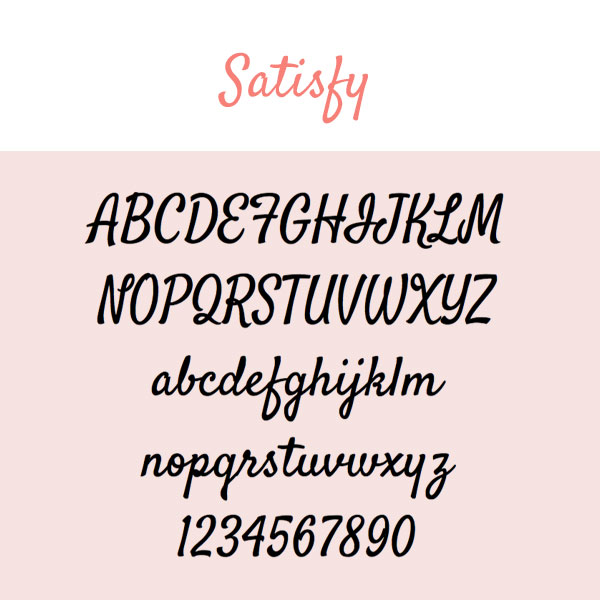
10. Satisfy
Yes, I picked a lot of scripty fonts for this boudoir-inspired collection! Satisfy is a more laid-back style of cursive. Some letters conform to the rules; some do not. Does your brand speak to the non-conformist? Try out Satisfy.

11. Yesteryear
Yesteryear is one of those fonts that reminds me of something yet I can’t quite put my finger on it. It evokes a familiarity. Déjà vu. The uppercase letters are striking. Their lowercase counterparts are delightful in their own right. Yesteryear makes a great choice for a headline that the eye will want to connect with.

12. Fredericka The Great
Does your brand tell a story … a fairytale? Do your clients leave feeling like a princess after shooting with you? If that sounds like your boudoir photography style, Fredericka is for you. Fredericka The Great looks like the text printed on an illustrated cover of a fairytale. It’s the font that will leave you feeling happily ever after. Test it out in all of the colors of your brand palette … it will not disappoint.

13. Tulpen One
Tulpen One is definitely one funky little font. Teardrop shapes differentiate this typeface, giving it an artistic and modern spin. Does your boudoir brand have a flare? Incorporate Tulpen One into your graphic designs! (Pssst…don’t be afraid to use all caps with this one!)
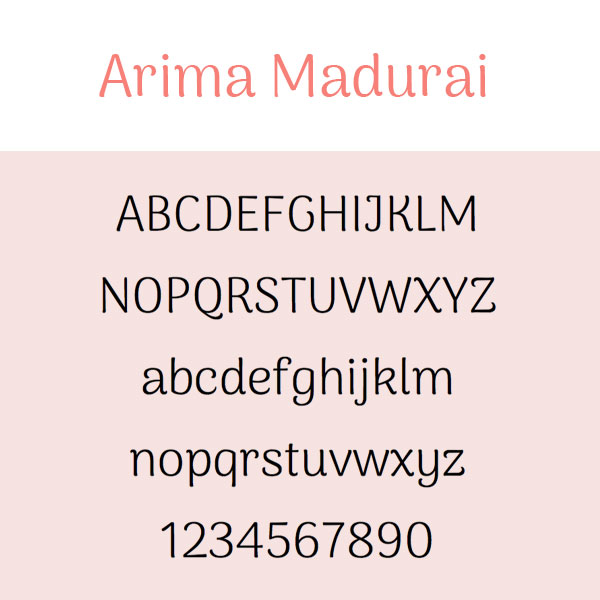
14. Arima Madurai
Arima Madurai would make for some very precious body copy text. It’s slightly whimsical yet very neat. Do you have a free guide that you give to your clients? Freshen up the design with Arima Madurai!

15. Vast Shadow
I love Vast Shadow! This font is flashy and dimensional. It’s perfect for big headlines that need to give off the WOW factor. To preserve the 3D-like effect that this font gives off, I would recommend placing it on top of either a solid or very transparent type of background.

16. Flamenco
You say Flamingo, I say Flamenco. This font is ultra cool. It’s fairly thin so I’d suggest using Flamenco for body copy. Be sure there’s good contrast between the color of the text and the background in order to let this little gem shine!

17. Zilla Slab Highlight
Highlight all the beauty of boudoir with Zilla Slab highlight. This font looks amazing in every color of the rainbow! You can use it to draw major attention to your headlines or even sub-heads. Take the Slab for a spin!
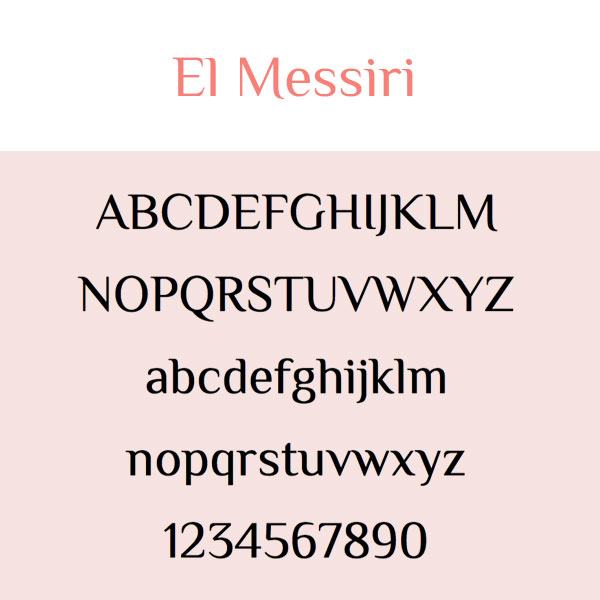
18. El Messiri
El Messiri is a pretty flexible font. Create a punchy sub-head using all caps or apply it to your body copy for that storybook kind of feel.Either way, I think you’ll have lots of fun with this one.

19. Crimson Text
Why use standard and boring fonts like Times New Roman and Garamond when you can be using a beautiful font like Crimson Text? It’s the little things that can totally upgrade the level of your marketing. Try Crimson Text for body copy text and see the difference.
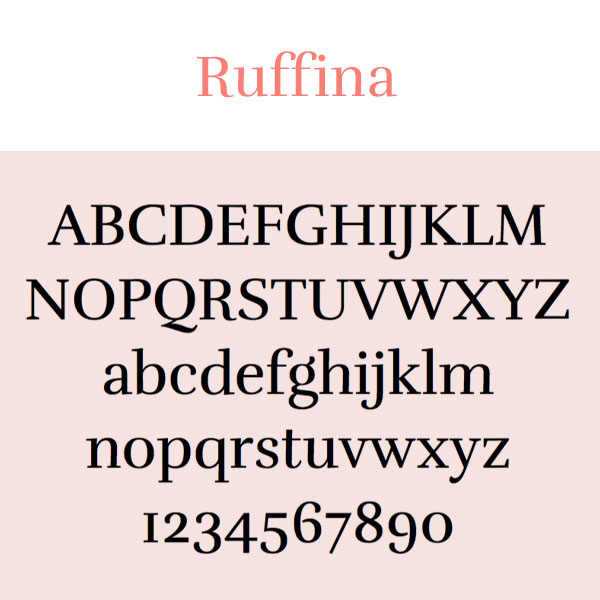
20. Ruffina
Ruffina is a gorgeous serif font that’s bold and extremely legible. There’s just something about it. Like the words in a juicy romance novel, any text written in Ruffina will leave you wanting more.
There you have it … 20 FREE Google fonts that will transform the look of your boudoir photography brand. Try ‘em and comment below with your feedback!
For more deets on downloading, embedding, or using Google Fonts, read this blog post: How To Explore & Download Google Fonts

How To Explore And Download Google Fonts
One way to really differentiate your marketing for your small business is to experiment with different fonts. Times New Roman, Arial, Garamond … those are the same old, same old. Everyone uses those. Did you know that Google offers over 900 font families that you can download and use for free? In this blog post, I’m going to teach you how to do this.

One way to really differentiate your marketing for your small business is to experiment with different fonts. Times New Roman, Arial, Garamond … those are the same old, same old. Everyone uses those. Did you know that Google offers over 900 font families that you can download and use for free? In this blog post, I’m going to teach you how to do this.
Why I love Google fonts so much.
Ok, so there are two reasons why Google fonts are completely awesome. First off, every font family in the massive library of fonts is open-source. What that means is you can download and use them any way you want … for free! Yipppeeeee!
Aside from the open-source licensing, another reason I love Google Fonts is because of the variety. The library offers a robust mix of beautiful styles that can be mixed and matched to suit any brand.
Sorting Fonts
Alright, now it’s time to take a trip over to the Google font library!
fonts.google.com
When you hit the Google Fonts main page, it will look something like this.

As you scroll through the page, you’ll realize there’s A LOT to choose from. Thankfully, you’re on a Google website and the search functionality is bar none.
On the right side of the screen, you’ll find a menu of options. This menu allows you to filter the collection based on a number of different criteria:
Categories
Serif:
In typography, a serif is a small line or stroke regularly attached to the end of a larger stroke in a letter or symbol within a particular font or family of fonts. A typeface making use of serifs is called a serif typeface. (Wikipedia) Times New Roman is an example of a serif font.
Sans Serif:
Typeface that doesn’t include the little strokes just mentioned above are referred to as sans serif fonts. Arial is an example of this.
Display:
A display typeface is a typeface that is intended for use at large sizes for headings, rather than for extended passages of body text. (Wikipedia)
Handwriting:
A handwriting font is just what the name suggests … a font that looks like handwriting!
Monospace:
A monospaced font (opposed to a proportional font) is a font whose letters and characters each occupy the same amount of horizontal space. (Wikipedia)

Image from Wikipedia
Sorting
Using the Sorting filter, you can view font families based on what’s currently Trending or the most Popular fonts. You can also filter by Date Added or put the fonts in Alphabetical order.
Languages
The majority of Google fonts are in English but there are font options in several other languages as well.
Sliders
The sliders in the filter menu are very cool. There are sliders for Number of Styles, Thickness, Slant, and Width. By moving the slider to the right on any one of these options, you’ll be presented with fonts that represent more of the particular characteristic you’re filtering. (For example, if you moved the slider all the way to the right on the Thickness option, you’d see the thickest fonts in the library.)
A Note about Number of Styles:
Some fonts are offered in varying styles. For example, the font Arima Madurai is offered in eight different styles ranging from Thin all the way to Black. Depending on how you’ll be using a font, you may want to consider downloading multiple different versions of it.

Choosing Fonts
The Google font library, even with its amazing filtering capabilities, can be a tad overwhelming. How does one choose a font with all of these incredible options?! Well, my advice is to explore the library and click on the fonts that speak most to you (and, of course, speak to your small business brand). I personally have a thing for sans serif and handwriting style fonts. 🤓
If you click on a font that you like, you’ll be brought to a details screen, which looks like this:

In this example, I had clicked on the font called Satisfy. The details screen shows all of the characters in the collection and even lets you type in sample text so you can see what different words or phrases will look like written in the font!
To view sample text, simply click where it says “Click here to preview text.” (This is found in the middle of the page underneath Styles.)
After you type your text, you can use the red slider to change the size of it. In my example, I bumped the point size up to 90 so I could see what my text would look like as a big headline. 🍍😊

On the left side of the screen, you’ll see a menu of fonts that will pair nicely with the font you’ve selected. By clicking on any one of these options, the paragraph text to the right of it will change to that particular font. It’s a great way to see how other fonts will coordinate with your selected font … which helps narrow your search, too!

How To Download Fonts
Once you’ve selected a font that you like, you can go ahead and add it to your collection to download! To do this, simply click the little red plus icon. (It will be at the upper right corner of the details page or to the right of each font listed on the main page.)
Each time you select a font, it will be added to your collection. The collection will remain in an expandable box at the bottom right of the page as long as you have fonts selected. To access your collection, click the minus sign on this expandable box.
When you expand the collection, it will look something like this:

To download the font(s) in your collection, simply click the icon that looks like a down arrow with a horizontal line underneath it (it’s in the top right corner of the box). A zipped folder will then be downloaded to your computer.
If you’re on a Mac, you can double click the zipped folder to unzip it. Then open the unzipped folder and double click the font file. This will trigger your Font Book to open. Click Install Font and BOOM! The font is installed and ready for you to use!
Happy font browsing! Comment below and let me know what you download. :)
